ASUS MAXIMUS VII GENE
This is the Z97 iteration of the famous Republic Of Gamers (ROG) mATX format ie. Gene series, of Asus Intel LGA1150 motherboards aka M7G for short amongst its owners. Unlike the recent additions of the lower budget ROG series of the Hero and Ranger models in the ROG line up, the Gene has constantly been maintained by Asus as a premium product in the ROG range. Its main distinction is its mATX form factor.
Official Page

Official blurb
"Most powerful Z97 mATX gaming board with fully-loaded specs and ROG-exclusive features
Intel® LGA1150 4th, New 4th & 5th-Generation Core™ i7/Core™ i5/Core™ i3/Pentium®/Celeron® Processors Ready
Intel® Z97 Express Chipset with M.2 support (up to 10Gb/s data-transfer)
Intel™ Ethernet + LANGuard + GameFirst III –This is game networking taken to the next level. This is ROG
SupremeFX Impact II + Radar II – New and improved discrete audio card that’s beyond compare
KeyBot + TrueVolt USB - Instant keyboard upgrade and rock-steady 5V USB supply
USB UEFI BIOS and Secure Erase - Award-winning simplicity and factory-fresh conditioning for superb performance
World’s first dual-color PCB with a matte black and red finish"

Don't you just love the sleek Asus marketing machine with their wonderfully taken photos and annotations? Think they are simply tops at this game.
And these following cutesified marketing icons from the Asus website seem to work for some too! lol


Just a second though, I simply have to single out this particular unassuming looking thumbnail icon... it represents the immensely powerful to die for Asus only USB UEFI BIOS Flashback* - no CPU or RAM needed to flash a new BIOS so you won't need to obtain unnecessary hardware just to update the BIOS. Yes, sit back and watch the competition cry, each time a new CPU stepping is released...

More info is available by clicking the following link
USB BIOS Flashback - Update your BIOS without even needing a CPU or RAM!
*Apparently, the motherboard Intel ME firmware is not updated via USB BIOS Flashback
Check out this table posted by Overclockers.com on the new improvements.

Compelling enough?
And these following cutesified marketing icons from the Asus website seem to work for some too! lol


Just a second though, I simply have to single out this particular unassuming looking thumbnail icon... it represents the immensely powerful to die for Asus only USB UEFI BIOS Flashback* - no CPU or RAM needed to flash a new BIOS so you won't need to obtain unnecessary hardware just to update the BIOS. Yes, sit back and watch the competition cry, each time a new CPU stepping is released...

More info is available by clicking the following link
USB BIOS Flashback - Update your BIOS without even needing a CPU or RAM!
*Apparently, the motherboard Intel ME firmware is not updated via USB BIOS Flashback
Z97 vs Z87 - Gene vs Gene
As opposed to the majority of manufacturers which have seemingly scaled back on the Z97 series as compared to their Z87 model predecessors, Asus have actually gotten more aggressive with their features.Check out this table posted by Overclockers.com on the new improvements.

Compelling enough?
PREVIEW SAMPLE
Packaging
Comes in the signature Asus ROG box of red with white prints.


The flip side of the box cover emphasizes the current Asus pre-occupation with audio and networking so note the associated flashy ROG infused catchphrases like
- Best Gaming Audio
- SupremeFX Impact II + Sonic Radar II
- Sonic SenseAmp
- Sonic SoundStage
- Intel™ Ethernet + LANGuard + GameFirst III (to kill a Killer?)
Taking marketspeak as a third language does come in useful, sometimes!


Here are the Asus pretty marketing pics for their audio and networking efforts


Bundle
The SupremeFX Impact II daughter card comes uninstalled. Included too is a pretty Asus ROG case badge!

Maximus VII Gene
mATX format as with all ROG Gene models, the PS/2 port and metal backplates (proper anchoring screws) for the mosfet heatsinks are most welcomed!
- 4 x DDR3 DIMM, max. 32GB in dual channel, up to 3300(O.C.) speeds
- iGPU support with HDMI output
- Supports Quad-GPU for both SLI™ & CrossFireX™


Heatsinks
Think you can just make out the mosfet heatpipe and the mPCIe slot in the 2nd/3rd pics. btw, the Southbridge heatsink is lit by a nice red LED.


CPU Socket


Debug LCD

Together with the MemOK button, LN2 jumpered switch and multiple voltage measuring points in close proximity, also check out those fancy Asus labelled gold chokes. Oh, that switch should give you a hint of the overclocking potential and ego inflating moments for the afflicted LN2 crackheads.


Storage
A generous 8 x SATA3 (6 x Z97, 2 x Asmedia) and a single unobstructed M.2 port onboard


Onboard Buttons
2 big fancy LED lit ones for Pwr/Rst and 2 smaller simple unlit ones for Keybot/SoundStage too, also note the open ended feature of the x4 PCI-e slot and various other headers eg. thermal sensor/s


SupremeFX Impact II
This daugther audio card is user installable with the 2 provided screws, think you may be able to read off the ELNA branding (Made In Japan) on the caps in the 2nd pic


The Matte Red Black Dual Colour PCB
Clearly demonstrated in this shot hiding under the heatsinks, Asus is clearly proud of this new "World’s first dual-color PCB" development
This feature is discussed in some depth here
Asus ROG Forums
This feature is discussed in some depth here
Asus ROG Forums

Heatsinks Off
The M7G features a 8 + 2 phase power design with NexFET™ mosfets, 60A ferrite chokes & 10K black metallic caps. Without the mosfet heatsinks, the dual colour PCB is now inescapable from plain sight.


Note that Asus have studiously relabeled many onboard components mostly as Asus or ROG parts obscuring their origins eg. one can only hazard a guess at what the onboard CPU power supply aka digital VRM aka Asus Digi+ EPU ASP1257 controller was originally called.
Component Theme Matching
The long well established Asus ROG theme of red and black is undoubtedly the easiest rig theme to match today


At this juncture, the Asus Z97 Gene comes across as a very beautifully packaged model with the usual heavy dose of Asus marketing. Still, the ROG branding remains one of the most recognizable hardware platform around and the Z97 Gene definitely holds the banner up high in the hardware specs department.
Of course, the proof of the pudding is in the eating...
Of course, the proof of the pudding is in the eating...
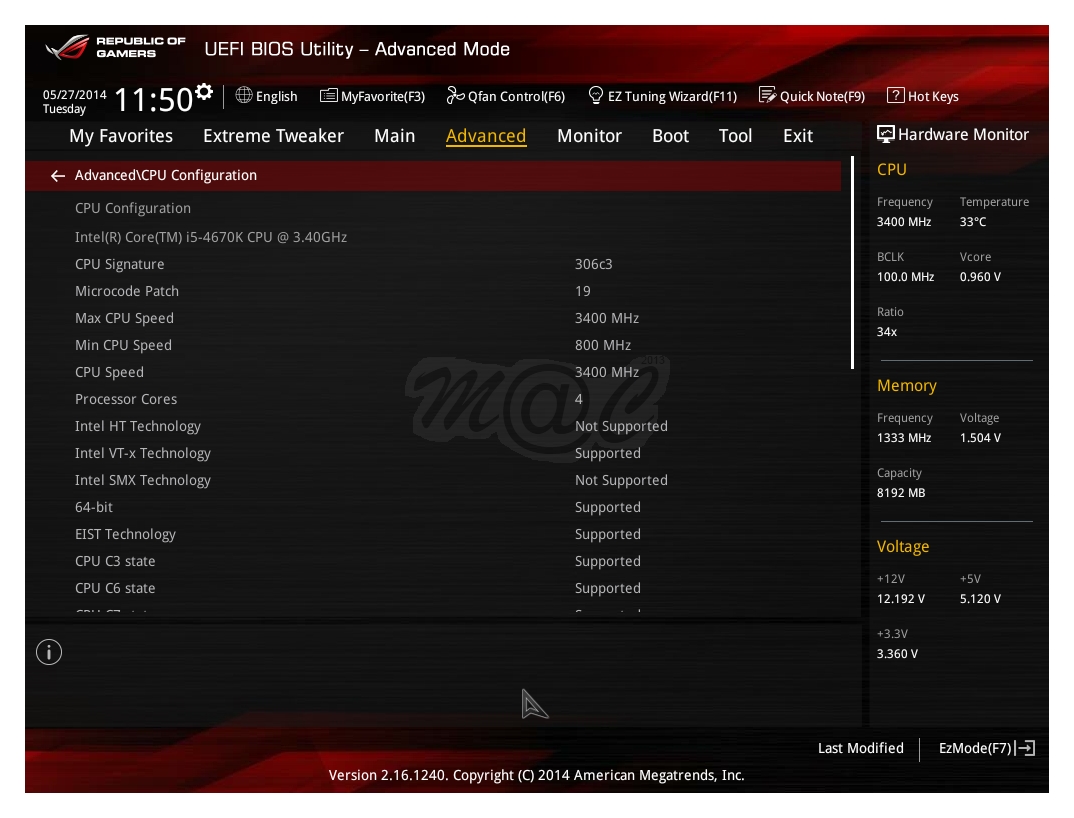
UEFI Screenshots (F12 Key)
In my experience, Asus motherboards very possibly have the best UEFI implementation so far and their latest rendition boasts of further improvements like added reporting functionality. The change history tracking list is superbly helpful too, for a quick overall recap on a single screen.




Test Rig Setup
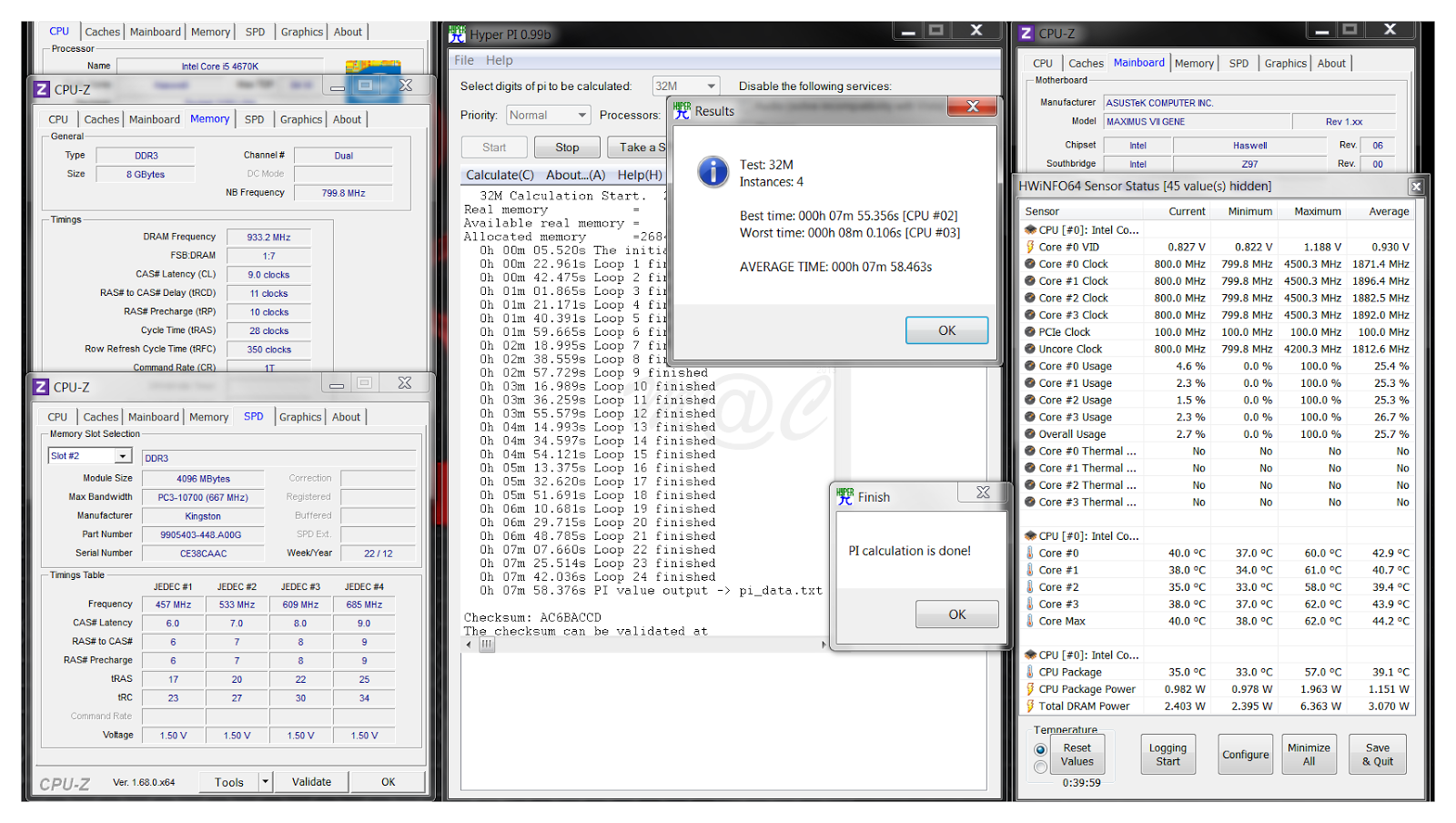
★ Asus Z97 Maximus VII Gene | i5-4670K@4.5GHz | NiCu HK 3.0-GTX360 | AMD R9 290 | Thermaltake Smart SE 630W ★Ambient local air non-a/c, Vcore setting done in +0.115V Offset Mode
RAM sticks used are
- 2 x 4GB KVR1333@1866@1.50V for those who want maximum cost performance at lowest cost
- 2 x 8GB Corsair Vengeance Pro kit 1866@2400@1.55V for those who don't mind paying more
HyperPi 32M

xvid4PSP


WinRAR


7Zip


Cinebench 15


AIDA64


HWBot Prime


3DMark
Just in case, should anyone be vaguely interested...


Initial Impressions
- Firstly, kudos to Asus for not diluting the Gene and other Z97 models unlike other makers
- No compromise ROG model in mATX format, sports the built for the thrill LN2 mode switch!
- Good build with all round quality components eg. digital power, discrete audio board, Intel GLAN, hefty sinks etc
- Fantastic UEFI - very likely the industry best
- Good overclocking for CPU, RAM - both budget and factory matched kit sticks
- Beautiful ROG aesthetics - subtle yet attractive LED lights
Can be improved...
- No mention of SATA Express
- The usual ROG cold double POST (it's a feature, not a bug... as they say - explanation, see post #8)
PS: for those interested, EK has plans for water blocks for this mobo


