Sunday, May 8, 2016

Silverstone Tundra TD02-LITE

A truly budget friendly AIO (all in one) 240mm closed loop liquid cooler from Silverstone


What Silverstone says...
This feature rich model is an excellent performer for the price and a great entry point for users looking to upgrade their system to liquid cooling.


PS: Tundra = cold place ie. low temperatures


Packaging

Brown non-glossy cardboard - recyclable as well as lowered overheads


Unboxing


Fans

2 x 0.30A PWN Silverstone 120mm fans rated for 92.5CFM@18~35 dBA, 1500~2500RPM


White Box Accessories 

Improved mounting mechanism with a nice versatile rigid backplate - much better over the flimsy excuses of earlier AIO designs... no more free spinning anchor screws!


Main Unit

Squarish combo CPU block and the slim 240mm radiator, both decked in flat black


Smooth copper contact plate finish - do remove protective plastic and apply just adequate TIM from the bundled syringe before mounting


Pretty cool yet unobtrusive ice blue LED effect during operation


Radiator fin density


Test Setup

AMD APU A10-7870K (features soldered IHS so no heat transfer bottleneck, nice!)
Radeon R7 series iGPU driving a Dell U2713HM monitor at 2560 x 1440 resolution
Asrock FM2A88X Extreme6+ - latest 4.20 UEFI BIOS
Team DDR3-1600 - 2 x 2 GB sticks in dual channel
Stock AMD 125W heatpipe aircooler vs Silverstone Tundra TD02-LITE
Windows 7 x64 fresh installation
hwinfo64 v5.24 real time sensor monitoring - scrutinise mainly the mobo CPU temp sensor*

Open air mobox run ie. caseless

Ambient temps 33C as reported by SPH ST website - yes, yet another scorcher of a Temasek afternoon


*  idle onchip APU temp readings are notoriously uncalibrated by AMD and are thus meaningless, I even enabled negative temp reading (usage mean for LN2 gas heads) in hwinfo64 only to see how ridiculously far it can drop in idle... lol


The A10-7870K was...

  • Initially run at stock clocks on stock aircooler and was actually mildy undervolted 0.05V as the aircooler was running hot and noisy (nearly 5K rpm, BIOS fan normal setting) under the current hot dry weather spell. Overclocking is definitely not a feasible consideration consequently...
  • Next, it was run at the same stock clocks undervolted settings on the Silverstone Tundra TD02-LITE (BIOS fan normal setting)
  • Finally, overclocked/upvolted APU to 4.5GHz CPU core, 975MHz GPU core and 2GHz Northbridge on the Silverstone Tundra TD02-LITE (BIOS fan normal setting)


And results are as follows...


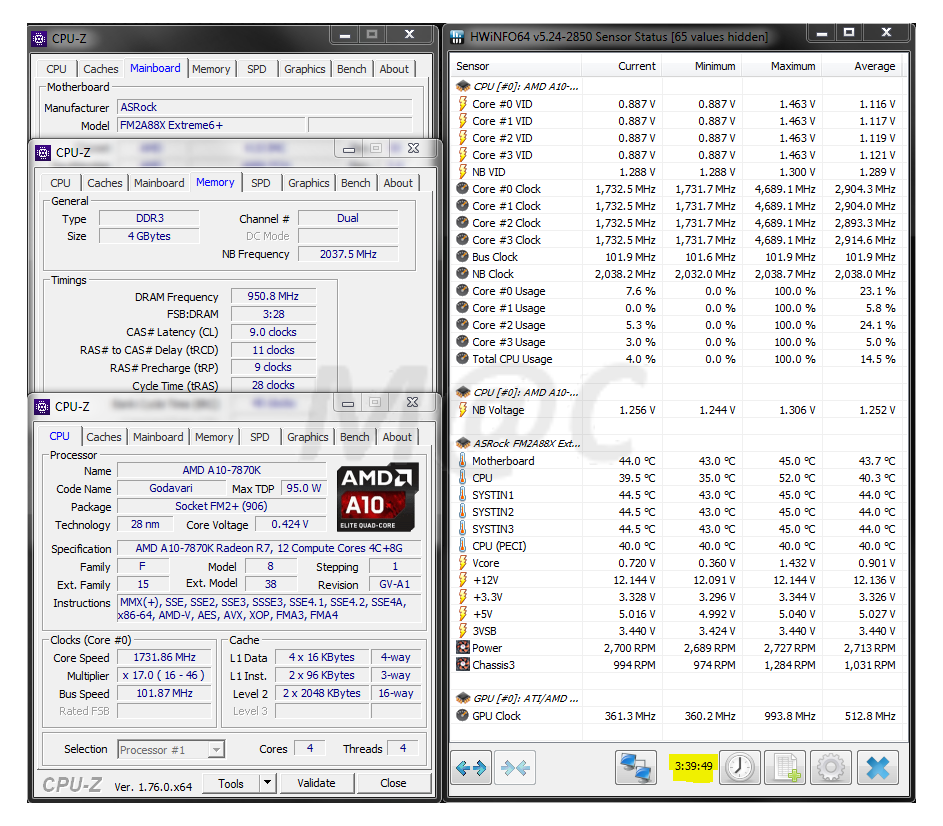
CPU-Z

First, an introduction to the layout of hwinfo64, the characteristics of the A10-7870K APU - Asrock FM2A88X Extreme6+ combo and the connection arrangement. The Tundra pump is connected to the mobo Pwr fan header at full ~2700 rpm while the Tundra fans are connected to the mobo 4 pin CPU header for PWM control.


* Note that the CPU fan sensors detection apparently seems to come and go on PWM mode even within the BIOS and hwinfo64 cos they possibly spin down just too low sometimes?


AIDA64

 
Stability Test Run
- all were run for and stopped at the same 5 min mark for mobo CPU temps sensor comparison


Stock


Stock on SS Tundra
- a significant drop of 12C load temps from 54C to just 42C for the CPU core and much quieter too!


Overclocked/upvolted on SS Tundra
 - back to 54C load yet do remember it is now running both faster and quieter cos the Tundra fans max at ~1900 rpm only, totally no where near the 5K rpm whiny AMD 70mm fan


GPGPU Benchmark


Stock


Overclocked/upvolted on SS Tundra
- again faster yet cooler and quieter


Cinebench R15 Benchmark

- only done when overclocked/upvolted on SS Tundra


Daily Usage Temps

Surfing, streaming, downloading and gaming (on iGPU) for just over 4 hours of monitoring shows very acceptable temperatures all round


Initial Impressions

Oh wow, this is seemingly the current lowest cost 240mm AIO cooler in town, well priced at sub-S$100, even lower than its China competitor. Check it here...

Its cooling effectiveness can be seen in the significant 12C drop over the stock AMD air cooler at the same settings. The bundled PWM fans allow one to adjust the fan speed and noise as dictated according to need.

As such, it should be attractive to 
  • non-hardcore overclockers wanting no fuss out of the box liquid cooling
  • peace lovers who treasure a tranquil silent yet cool running rig
  • aesthetic seekers after clean uncluttered looks
  • users of boutique RAM with tall heat spreaders
  • compact rig owners wanting a slim 240mm AIO liquid cooler (else check out the 120mm TD03-SLIM)
 
Design wise, the improved mounting mechanism with its rigid backplate is very much welcome for better clamping pressure as well as for less wear and tear from repeated mountings.

The initial setup does involve time spent discerning between the various Intel and AMD brackets and screws but the guide is both clear and concise so everything simply went OK at the very 1st try over here.

Overall, a well priced and effective renewed effort from Silverstone!


Bonus screenshots 
... a week after, testing A10-7870K benchmarks at ~ 4.7GHz CPU, 1GHz iGPU by bus clocking at 101.9MHz, loads temps are now lower probably cos of the cooler midnight ambient conditions and the TIM settling. 

Would normally use the simpler & safer multiplier only overclocking but the 1040MHz BIOS divider for the iGPU seemed to stutter in video when doing Cinebench. Just take more care when pushing APU bus overclocks cos it is intricately tied to lots of other parameters like SATA/RAM/NB etc. 


Bonus screenshot for AMD APU fans
... as expected, the A10-7870K runs the new LibreELEC (Kodi 16.1) nicely, like its other APU predecessors!


Saturday, April 16, 2016

Asrock Beebox N3150

The Beebox is Asrock's vision of the NUC which was introduced in Computex 2015.

Proudly touted as the World's First NUC Mini PC with a USB Type-C Port  - it's meant to be small,  light and fast like the hardworking bee.


NUC Background

The Intel NUC (Next Unit of Computing) is a family of small form factor PCs which debuted  a few years earlier in 2012 and are now a few generations down the road.


Intel

NUC Overview

Wiki

NUC


Asrock Beebox N3150

Asrock Beebox Series
Asrock Beebox Microsite


Suggested Usage

- home theater system (due to new H.265 support in Braswell)
- daily computing PC
- quiet bedroom PC or office desktop
- other users of NUC eg. kick-proof PC, VM testing etc...


Do not get this for...
- first person shooters
- heavy data crunching eg. video encoding
- bleeding edge hardware chasers, butt itchy frequent upgraders


Features

- cool running, low power CPU (just a parsimonious 6W)
- tiny size (maybe half a dozen stacked handphones, thereabouts)
- quiet (totally fanless in N3000 model)
- multiple communications option viz. GLAN, dual channel Intel 802.11ac wifi, Bluetooth 4.0, IR remote
- multiple video connections viz. DP, 2 x HDMI
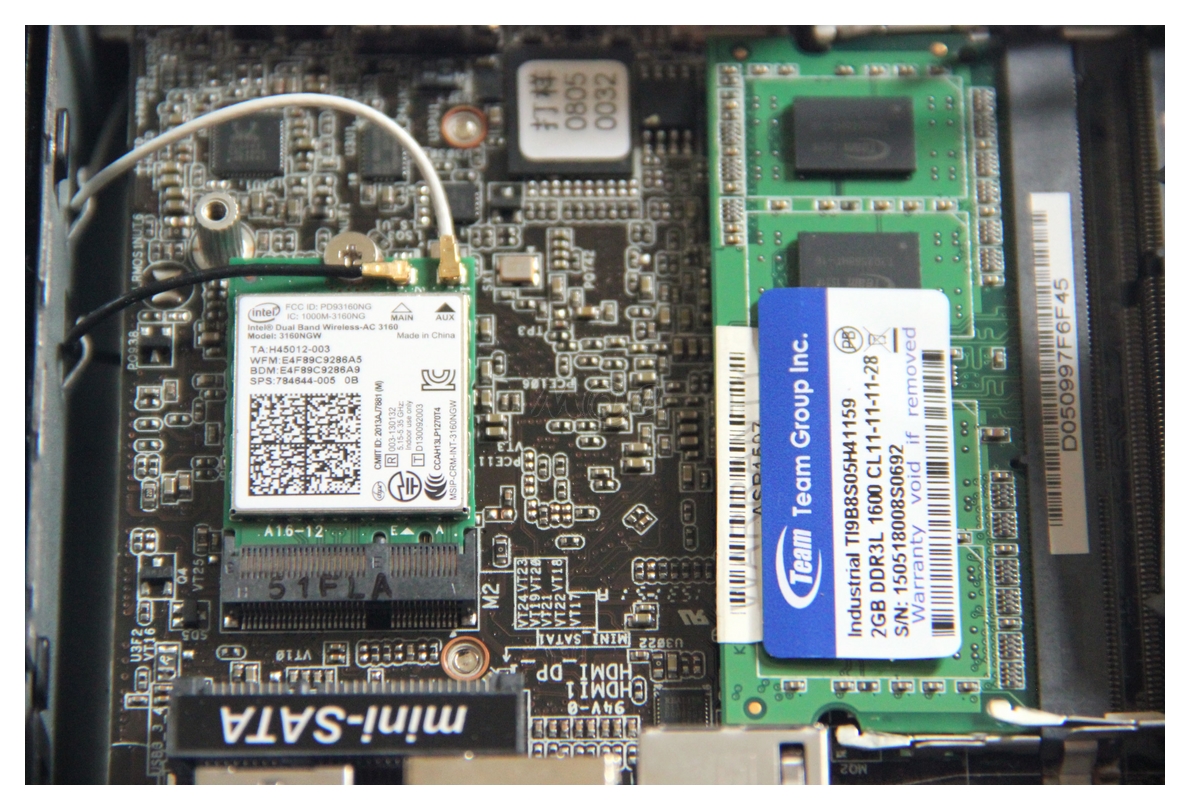
- multiple storage options viz. eMMC, SATA, m-SATA
- multiple RAM slots with dual channel feature
- up to date ports eg. USB-C, Displayport 1.1a, HDMI 1.4


Intel Braswell

14nm System On Chip (SOC) design introduced in 2015 as successor to BayTrail (22nm)
Intro
Kodi Forum


What's New With Braswell


4K, hevc video, dual channel RAM support etc...
LR Intro
Asrock claims that the Beebox supports Up to 48CH H.265 IP Cameras in D1 (704x576) resolution!


Choice Of OS

Windows or Linux or even both, why not?!
 The case for Linux (& its variants)

* This is a decidedly impt decision as the Windows HD Audio driver from Intel still does NOT support HD Audio passthrough (will it ever?) despite long repeated requests from endusers.
Intel - the case against a HTPC on Windows

Thus, the current intention is to run both OS on the Beebox for the best of both worlds experience
- Win 10 Home on the bundled 128GB mSATA SSD for daily operations like surfing, email etc...
- Linux Mint on the onboard 32GB eMMC or Kodi/Openelec on a flashdrive, purely for entertainment eg. video watching and streaming
- file storage on an add on a cheap spinning 2.5" HDD if need be


Kodi/Openelec Discussion

Asrock Beebox's very own dedicated Kodi/Openelec thread with developer support!
Openelec forum


Team-Kodi Developer, fritsch with Openelec

This guy is doing a great job with his releases, alternative releases to look out for come from another developer, Matt Devo, amongst other builders like Milhouse

fritsch Openelec v17
Milhouse v17
LibreElec v16.1 final
Suggested settings


Braswell vs Android Media Boxes

Discussion

Kodi forum warning about certain cheap Android boxes
"Its very common with dirt cheap Android devices to come with lots of Bugs and no after sales support. Most are absolute rubbish, using pump and dump Marketing techniques to seduce unwary newbie buyers. False product reviews are very common."


Future NUC

- very promising with exciting new capabilities but DDR4L only and mucho $$$
Intel Iris Pro NUC


Packaging Box


Front


Back


Unboxing


Bundle


Power Adapter

Note the bundled adapter is a real compact wall plug rather than a floor heavy power brick, nice!


Infrared Remote


Combo SATA/Power Cable

suggest owners had better not lose this impt tiny thingy...


CD, Quick Guide & VESA Mount


Beebox - Exterior


Beebox - Sized Up

With measurement rulers and a CD (anyone still remembers this archaic artefact?) for comparison


Beebox - Interior


UEFI BIOS Screenshots

Sports a modern graphical UEFI implementation


Windows 10 Screenshots


 Sysinfo


CPU-Z & GPU-Z


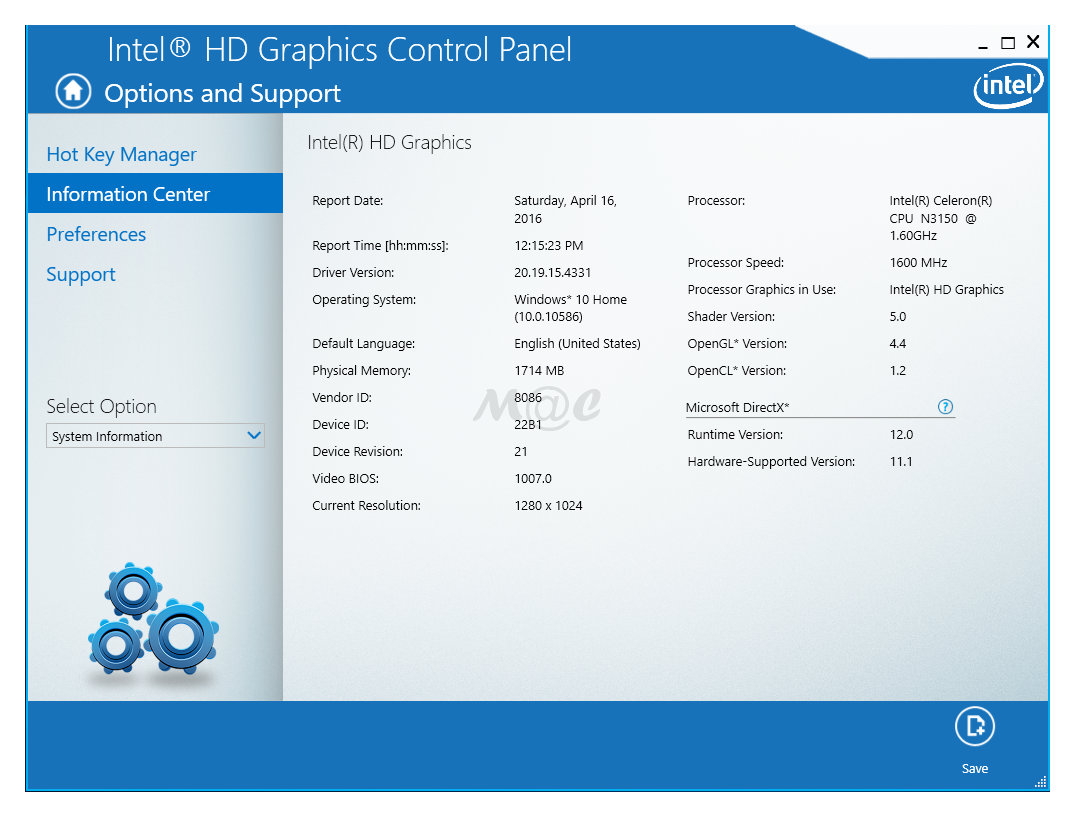
Intel HD Graphics


With a PC LCD


With a Full HD Sony LCD TV


Device Manager 

Showing the onboard Samsung eMMC and bundled mSATA Team SSD (2 x USB flash devices also seen, attached for test file transfers)


Benchmarks

With a Braswell Celeron at its core, this machine is targeted straight at budget PC users and definitely not at benchmark enthusiasts.

As such,  its benchmark numbers performance, though clearly improved over the previous Bay Trail generation as shown by many web reviews, is more of academic interest. Heavy data crunchers are simply not the target audience for these Intel budget SOC systems.

Nonetheless, those interested in hardcore numbers can reference the many web reviews listed at the end of this article. In addition, here's a detailed budget CPU shootout involving the Celeron N3150 itself - again as said, it seems an academic exercise to me cos few should be using these CPUs to do such tasks like video transcoding.
Hardware Secrets

Therefore, the focus here is on its features, capabilities and usable real life performance and less on actual numbers.


Intel 802.11AC wifi with Speedtest.net

A simple Q & D bench as a rough gauge, using the 5GHz wifi radio via an Asus RT-AC68U 1Gbps M1 connection. More importantly, video streaming over wifi in Openelec is also smooth, totally watchable and enjoyable.


The 2.4GHz wifi radio has a patchy performance as evident in anecdoctal web reports. Bluetooth operation under Windows 10 Home was also erratic but seems to work under Openelec as shown in this screenshot.


More Openelec beta Screenshots

This Openelec beta by Fritsch is very functional but seems to lack a screenshot capability so pardon the less than optimal handphone shot photos. Installation was straightforward and fast - boot from Openelec install USB flashdrive, choose destination device and voila, an Openelec boot drive within a few minutes.


With a PC LCD, idle


With a Full HD Sony LCD TV, ongoing streaming via wifi (video playing visibly in the background)


Openelec Uptime

The Beebox has already clocked over 15 hours of total uptime over 5 days so far which works out to ~ 3 hours of video streaming per day, super nice and stable!


Initial Impressions

The Asrock Beebox fulfills a niche in the truly tiny desktop PCs for undemanding home/office users and budget HTPC enthusiasts. Budget explained as in... the lowest cost Intel based NUC so far.
Intel's cheapest NUCs yet... beg for home theater use

With its H.265 hardware support, this Braswell unit should serve quite well into the near future as a HTPC rig, especially with such enthusiastic support from the Kodi/Openelec developers. The extremely earth friendly 6W TDP Intel Braswell processor makes it ideal for a cool running, low power setup for 24/7 operations eg. download station, video monitoring etc...


In addition, the flyweight total rig (with power adapter included) also makes it super convenient to be transported around.

Asrock's bundled package is very functional and practical but can be further improved if the bundled Windows 10 Home had been installed on the larger mSATA SSD instead of the anaemic onboard eMMC.

Overall, it's also mildly interesting for beginner tinkerers too, due to the easy complete access to the interior, exposed by simply undoing a few screws.

With my interest in NUCs newly piqued, I am definitely looking forward to the next round of oncoming NUCs although current indications show that they are going to be priced much higher (~650 USD, ouch!) by Intel due to the Iris Pro iGPU used. But for now, just sit back and enjoy your budget Beebox while saving up a pretty penny for the next gen NUCs.


Goodies & Freebies

For those who prefer using their smartphone as wifi remote controls over the bundled IR unit, try these great apps

Android - Kore, Official Remote for Kodi
iOS - Official Kodi Remote
Winphone - Unofficial remote apps


Web Reviews

Techpowerup
kitguru
Techspot
NUCblog
Hardware.info

Play 4K Video at 30fps?