Thursday, April 30, 2020

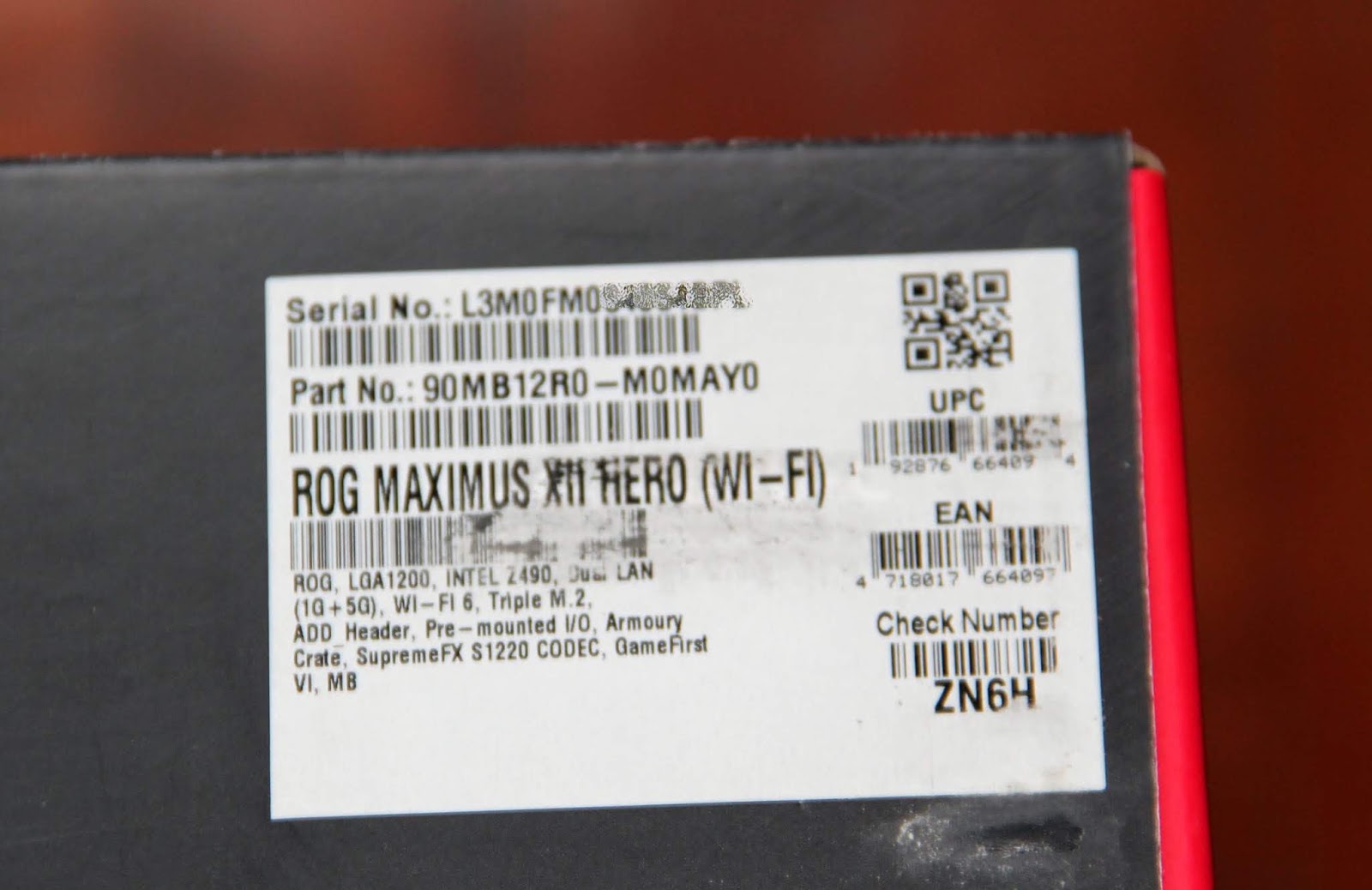
Asus Maximus XII Hero (Wi-Fi) Z490 Motherboard (Gen. 10, LGA1200)

aka Comet Lake-S (not Ice Lake)
aka 14nm +++ (not 10nm)
PCI-e 3.0 (not 4.0)


Features

  • Z490 Intel Chipset
  • 10th Gen. 14nm +++ support up to 10 cores
  • LGA1200 (back compatibility with LGA115x mounts)
  • PCI-e 3.0 (up to 40 lanes)
  • 8 layer PCB
  • Dual LAN - Intel GLAN and Marvell 5GLAN
  • Intel WiFi 6 AX201
  • Supports up to 3 way AMD CrossFireX or 2 way Nvidia SLI
  • Supports up to  4 DIMMs, 128GB, DDR4-2133 to 4700+ (oc)
  • HDMI 1.4b, up to 4096 x 2160 @ 60 Hz
  • SupremeFX audio S1220
  • Massive heatsinks with connecting heatpipe
  • 8 x PWM/DC headers
  • 3 x M.2 slots and 6 x SATA 6Gb/s ports
  • Up to total of 17 x USB ports 
  • Asus Aura RGB
etc...


And here is an earlier leaked Asus slide which is mostly spot on and still seems to be useful for a quick glance at the features.


Unboxing


Bundled Accessories

  • Cables - 1 x Addressable RGB extension cable 1 x RGB extension cable 4 x SATA 6Gb/s cables
  • Additional Cooling Kit - 1 x ROG assistant fan (40mm)* 1 x Fan bracket
  • Miscellaneous - 2 x M.2 Rubber Package 2 x M.2 SSD screw package 1 x ROG key chain 1 x ROG logo plate sticker 1 x ROG stickers 1 x thank you card 1 x ASUS 2x2 dual band Wi-Fi moving antennas
  • Installation Media - 1 x Support DVD
  • Documentation - 1 x User manual

* Quality Sunon Maglev fan model MF40101V2-1Q030-S99, no less!


Motherboard

Overall, a very eye pleasing yet solidly functional design with its onboard buttons for hands on builders.

Gone are all traces of the reds of yesteryear, it's all dark black stealth now. RGB fans, note the existence of ROG LED lights in the Southbridge and back shroud.
 
The CPU socket, sitting like a boss, surrounded by the massive open finned heatpipe heatsinks. Following photos show the full SMD caps in the socket, both front and back. PCI-e slot arrangement is nicely spaced out for most common uses too.


Back of the motherboard shows all heatsinks nicely anchored down with proper screws.


No worry about insufficient CPU juice as evidenced by the 8+4 12V power plugs.


Flexkey
Aptly named interesting feature


A flat lying USB 3.1 header is very welcome for cable management. Plus plenty of storage options onboard.


The location of the CMOS battery is one of the better recent designs around, conveniently out of the way of any thicc GPU.


UEFI BIOS Screenies

Simply glance through this as my usual spiel about the industry leading Asus UEFI features which I happen to love especially with the track changes feature... think you have heard it more than enough times by now. So here are just a handful of sample UEFI screenies. lol


OG Factory BIOS 0222


Test BIOS 0503

Wah, BIOS update insta-downgraded the Kabuto3 cooler ratings... not that it actually means anything to anyone except to the OCD otakus.


Intel Core i5-10600KF (ES)

Came simply in bubble wrap without any bundled cooler. This is the lower priced KF version which lacks an iGPU. 

Intel has now rehashed the same cores socket size so many times that they have to drop the PCB notches way below the etched markings on the IHS, we simply can't have users mistakenly dropping this chip into the innumerable LGA115x permutations. :)


Intel Core i7-10700K (ES)


Recommended Cooling

And as for the actual cooler recommended, this is what Intel's very own tech guru had earlier said.


Aaron Mcgavock is from Intel’s Client Performance/Enthusiast Strategic Marketing department.


And note that this 130W PCG2015D cooler is just about stock operation so will overclocks be... ?


Test Setup

Asus ROG Maximus XII Hero (Wi-Fi) Mainboard
Intel i7-10700K (ES, non-retail) - with iGPU, a good sample of clearly better bin than the i5
Intel i5-10600KF (ES, non-retail) - lower end sample lacking iGPU, tiny wisp of time spent with this one (pity!)
2 x 8GB Crucial Ballistix DDR4-3200 kit@XMP
Micron MX300 SSD
Corsair RM1000 PSU
Scythe Kabuto3 stock (air cooled in SG, yes!)
Windows 10 build 1909 Q+D install with latest updates
Open air test rig with i5-10600KF (late April) and i7-10700K (mid-May 2020), SG ~26-30C

The HD630 iGPU was used with the i7-10700K and it surprisingly supported the full 2560 x 1440 WQHD resolution via HDMI.

Latest generation of processors from both camps seem to be pushed and retailed at near max clocks so overclocking them isn't quite like what it used to be. Still, a little more performance can be squeezed out for the patient tweaker at 5GHz all cores loaded for the i7-10700K.

Note also the near inmutable t-loan test time constraint of a couple of days with each ES sample, oh well. lol


hwinfo64 Summary


BENCHIES


CPU-Z

"Please, Sir, I Want Some More" - just a little more performance for both single and multi-core scores.


7-Zip Bench


Realbench 2.56

Note - no overall score cos OpenCL run for the HD630 iGPU was  not carried out.


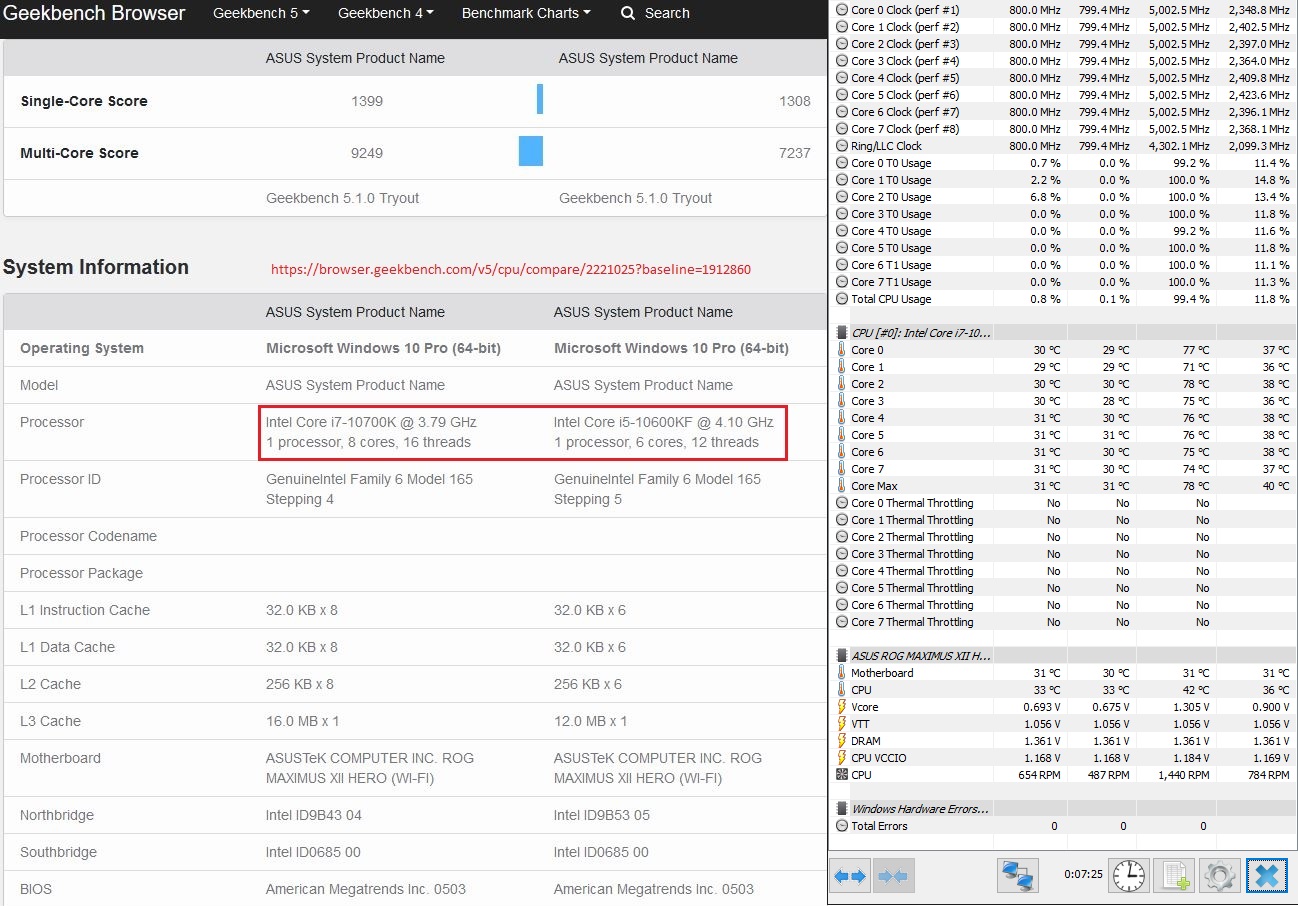
Geekbench 5

Bonus of a comparison vs i5-10600KF ES (stock clocks) earlier loaner


HyperPi 32M

still my go to quick and dirty RAM stability test, amongst others


AIDA64 Benches


Cinebench R15


Cinebench R20

This bench is probably the most punishing of this whole lot with the highest load temps achieved (no throttling noted). Given more time to explore the rich Asus options, this bench is also great for showing the possibilities achievable with some trial and error testing effort with the various UEFI options (more later).


BIOS Options to explore

These were my thoughts while tinkering with the earlier i5-10600KF sample which is decidedly a poorer bin sample needing more effort but unfortunately simply lacking the time to do so. AVX/AVX2 usage generates lots of heat so meddle around with the -offset to your satisfaction if you utilize lots of such features.


AVX Offset -2

5GHz/4.8GHz scores dropped slightly vs 5/5 but load temps has significantly also come down too, acceptable outcome?


Best Case Scenario SVID

Dramatic improvement with just a single BIOS option change. The resultant load Vcore and max load temps both dropped significantly. Opens up the possibility of overclocking on air now. strongly advise the F9/F10 crowd to at least explore and test out this one single option for a greener and more lasting PC.


Core Ratio AI

Another of the dramatic single UEFI options which is essentially no brainer overclocking by the motherboard AI. Of course, it is good to check that the option still runs a stable system. Multicore runs the i5-10600KF mostly at 4.8GHz@1.22V with momentary spikes to 5GHz@1.45V. Ungreen option though with such diminishing returns.


UEFI Where?
Pictorial guide for Asus UEFI noobs in case someone wants it.


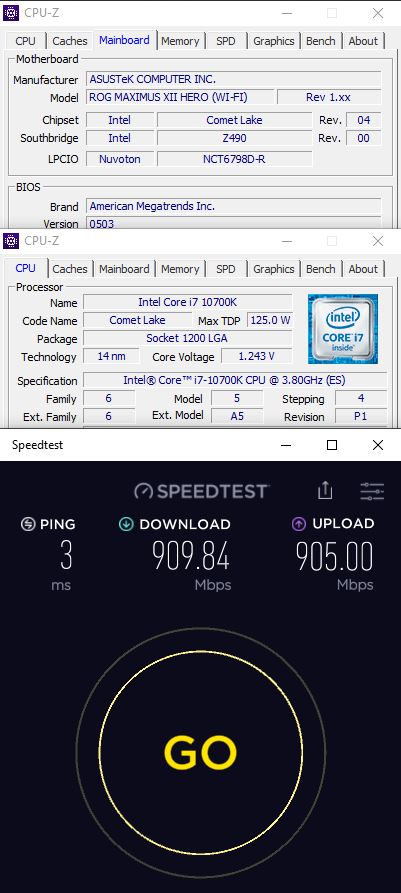
Speedtest

on a wired 1Gbps connection


Spectre and Meltdown?

Another Intel's Achilles heel these past few years.

Looks like apps like these needs to be updated for newer hardware fixed CPUs in 2020. The latest GRC InSpectre version is from 2019 while AShampoo is from 2018, both are likely outdated so be forewarned about the results.


PCI-e 3.0 or 4.0?

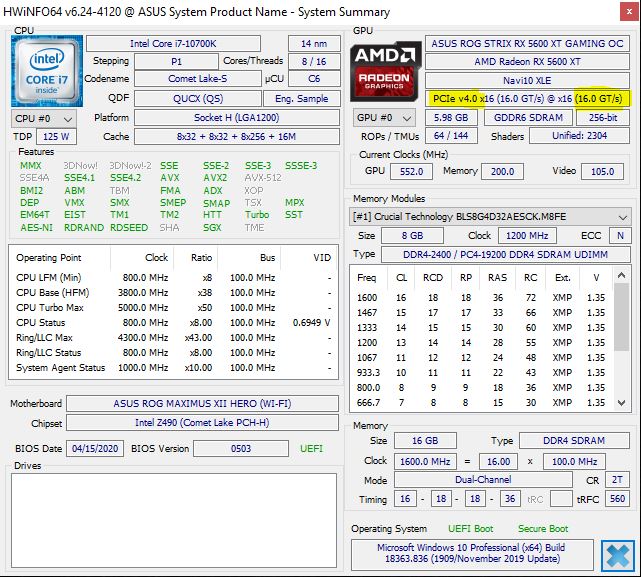
Other unusual reporting include PCI-e 4.0 reported by both current hwinfo64 and older GPU-Z versions as seen below. The latest GPU-Z correctly reports 3.0 so you do need updated software for proper readings.


Favoured Cores

Probably easiest to show via CPU-Z as shown below in RED for cores #2 and 3.


S3 Sleep Resume

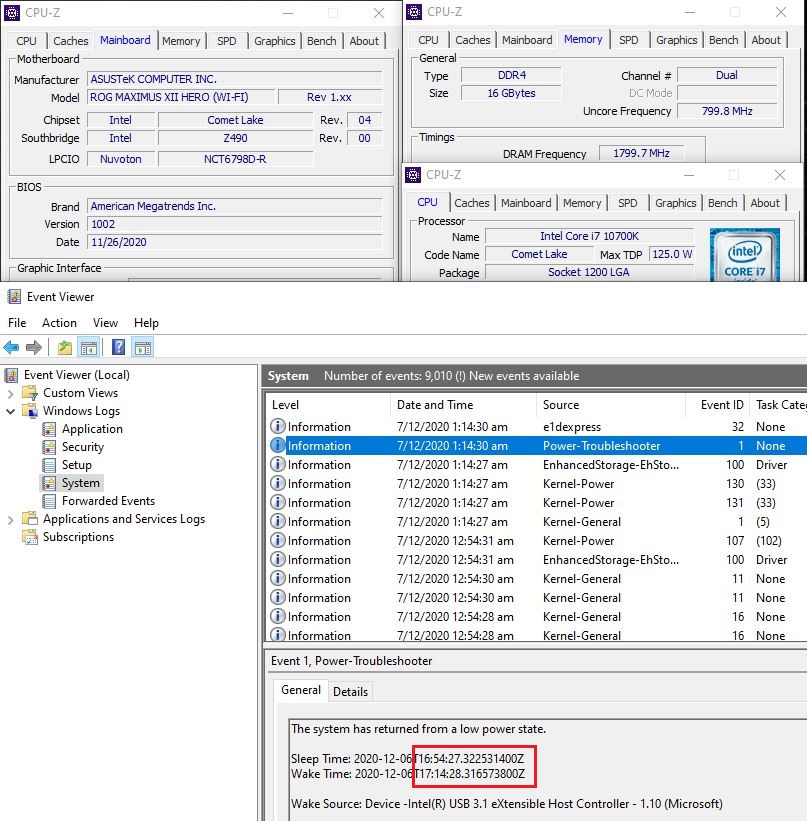
Rarely test for this feature nowadays with boot SSDs in widespread usage but S3 works great here.


Initial Impressions

Solid motherboard - trouble-free, easy setup with fast startup, single POST boot times and stable responsive day to day running.

Quite enjoyed the little allocated time spent tinkering with the test setup. The system felt very smooth just as any modern well equipped PC should. Installation was simply straightforward with far fewer issues about missing boost clocks, alternative power schemes, problematic driver/BIOS updates and other AGESA what nots. Intel has just been doing minor incremental tweaks since 2014 (14nm+++) so there is no drama and of course, it is all stable (and staid).

The max CPU load temps in Cinebench R20 seem a little high on air but fortunately, no thermal throttling was observed. One just wonders how the 10 core i9 would perform on air locally... Good thing that the Asus motherboard kept cool and stable, with its more than adequate cooling and power onboard. Its hwinfo64 sensor readings remain comfortably low under load.

From the looks of this testing, running this 8 core i7-10700K ES sample at 5GHz all core loaded on budget air cooling is actually great. All voltages used and load temps observed seem low and safe enough for long term usage. NB: the Scythe Kabuto3 was bought a while ago via Amazon SG for less than SGD60, iirc.

The Asus Maximus XII Hero motherboard performed admirably throughout as it is clearly designed and built for the higher end processors so kindly get moar coars models if you can find them at reasonable prices.

The new Intel RRP for the 10th Gen processors means it is much more attractive for newcomer Intel buyers vs the previous 9th Gen eg. i7-10700K USD374 vs i9-9900K USD488. Despite the status demotion in nomenclature from a i9 to a i7, these processors are virtually identical in form and function to most end users. Guess that is as far as one gets from Intel with $100+ price cuts without admitting any defeat this round.


And congrats Asus, you have done your usual finely polished job in pushing out this solid motherboard but as usual, your efforts are again held back by Intel's badly ageing processor series across every level vs AMD competition. Simply still stuck at 14nm +++ till who knows when.


Eventually for die hard Intel fans and money no problem gamers, mostly. Till Zen 3 strikes back...


Friday, January 24, 2020

New 1080p MVP? Asus ROG-STRIX-RX5600XT-O6G-GAMING Graphics Card

So do we or don't we, have a new 1080p MVP according to AMD?
 
Everything seems to be coming up roses for AMD the past few months, much to the joy of PC end-users worn and jaded by a decade long state of technology stagnation.

AMD have managed the near impossible by beating Intel into helpless submission throughout their entire Zen CPU/APU processor range, hooray!

Now, the GPU division is gunning for Nvidia with their latest mainstream 7nm Navi effort, touting superior cost performance at 1080 gaming. And as if this was not enough, they immediately upped the value and challenge by unleashing more goodies in the form of a BIOS flash speed upgrade when a reactive Nvidia dropped prices to compete.

So now it's... 1080p and beyond?

Besides higher clocks, 7nm also means AMD is able to recommend a parsimonious mere 450W power supply for the RX5600 XT cards.


Official Website

https://www.asus.com/Graphics-Cards/ROG-STRIX-RX5600XT-O6G-GAMING/


Asus ROG Strix RX5600 XT  Gaming GPU


  • PCI Express x16 4.0
  • OC Edition: Boost Clock ~1770 MHz (OC Mode)/ ~1750 MHz (Gaming Mode)
  • Axial-tech fan design features a smaller fan hub that facilitates longer blades and a barrier ring that increases downward air pressure.
  • 0dB technology lets you enjoy light gaming in relative silence.
  • 2.7-slot design expands cooling surface area to make the most of the three powerful Axial-tech fans.
  • Dual BIOS switch lets you toggle between Quiet and Performance BIOS profiles sans software.
  • Auto-Extreme Technology uses automation to enhance reliability.
  • Super Alloy Power II includes premium alloy chokes, solid polymer capacitors, and an array of high-current power stages.
  • MaxContact Technology allows 2X more contact with the GPU chip for improved thermal transfer.
  • A reinforced frame prevents excessive torsion and lateral bending of the PCB.
  • ASUS FanConnect II equips two hybrid-controlled fan 2 headers for optimal system cooling.
  • Aura Sync - features Aura RGB lighting both on the shroud and backplate.


Unboxing

Simple bundle inside


Wah, very big card... and 2.7 slots thick too.


BIOS switch between P(erformance) and Q(uiet) as well as LED lights toggle switch.


Asus!!! So very nice of you to throw in an extra free round white sticker to make our lives more complicated... yet more 1st world issues to fuss over.


 8+6 pin power plugs just mean serious business, the pretty white ROG logo does light up too!


More pin headers (FanConnect II) for yet more fans... yums, 5 big fat heatpipes (the 6th is not visible here)!


Rather unique ringed small hub fans to concentrate the air intake


The mosfet sink is clearly evident here


Showing off the sole HDMI 2.0b output amongst the 3 covered DisplayPort 1.4 outputs.


Wonder if there is any chance of further improving heat transfer between the bare Navi core and the heatsink (bare Alu or nickel plated?) for the restless liquid metal enthusiasts. It must be also noted the factory warranty will likely also be considered overclocked consequently. Go Google for the nice close-up shots in the TPU review.


Video

https://www.amd.com/en/graphics/amd-radeon-rx-5600-series


BIOS Upgrade

Very straightforward and fast. Uses just a single flash update Windows application unlike some other brands. Definitely ensure your system is stable before doing any flashing.


Source
https://dlcdnets.asus.com/pub/ASUS/Graphic%20Card/ATi/ROG-STRIX-RX5600XT-O6G-GAMING/ROG-STRIX-RX5600XT-O6G-GAMING_BIOSupdate.zip

PC World report
https://www.pcworld.com/article/3516108/amd-radeon-rx-5600-xt-graphics-cards-vbios-confusion.html


* Do note that this flash upgrade is both free & optional so just ignore those attention seeking naysayers on Youtube making mountains out of molehills over this so called AMD fiasco. Simply leave it out if you are not comfortable with flashing the card or perhaps ask the distro to do it for you.


Procedure


New BIOS

P BIOS


Q BIOS


OG BIOS


Setup

Asus Strix RX5600 XT | Ryzen 3600X uv air | Asus Crosshair VI Extreme X370 | 32GB Ballistix Sports 3200@3600 | 500GB WD Black nvme | Win 10 1909

The following initial tests were done using the new Q BIOS so one can expect defnite better performance with the new P BIOS with its even higher clocks. Guess I currently still subscribe more to the anti-noise/heat/dust/RGB camp.

Open ambient air, non-ac Jan 2020 weather


Special mention must be given to current state of affairs of AMD Radeon drivers.


The latest AMD Adrenalin 2020 20.1.3 driver package weighs in at an astounding 1.23GB installation folder size. It is every bit overly ambitious and painfully intrusive too. It drives, it streams, it overlays, it records, it browses, it advertises etc... and unfortunately, it forces monitoring with logging down everyone's throats. Installation desperately needs to be made more flexible offering optional modules instead of its current all or none monolithic method.


It is likely just trying too hard, anecdotally giving grief to users by being so overarching in its breadth with its twitchy instability. Once the new card drivers were installed, my previously stable system developed a random reboot problem.

A few troubleshooting steps later and the problem was narrowed down to the drivers conflict especially the monitoring portion clashing with hwinfo64 GPU monitoring. Stability immediately returned once GPU monitoring options were disabled in hwinfo64, there is no option to disable these in Adrenalin. Fortunately, Afterburner GPU monitoring seems totally OK. Everything is running great for over a week now with no obvious issues so this driver conflict is successfully circumvented for good.

Another peeve, the SSD activity LEDs have also been working overtime too since the Adrenalin drivers were installed. Too bad, there is also no option to disable sensor logging with the current AMD drivers.


Yes AMD, just fix your drivers already and kindly please spare us such pain ASAP. But software peeves aside, almost everything else is overwhelmingly positive with this card... ha!

PS: Oh, if you enjoy watching bearded guys with long flowing Shirley Temple curls spend 10 painful minutes rambling on and on about AMD drivers, try this narcissistic link - https://youtu.be/pboDbxogSw4


Daily 24/7 Sounds Of Silence

Imagine surfing on your PC with zero fan noise from the GPU yet remaining at admirably low temperatures. This pure AMD test rig is sited on the table top, running just besides me and it is near silent as the CPU maglev fans are also running quiet, sub-1K rpm.


Gears 5 Benchmark

DirectX12 only game.

My current game... exploring the depth of the SP campaign in short snatches of free time. Yup, enjoying it even if this is another MS console port. (I actually end up finishing the single player campaign with the test card the day after getting it.)

Conveniently, Gears 5 features a built-in benchmark with detailed reporting and gives the GPU a nice workout too.


OK, AMD said 1080p gaming so here it's running at 1080p with max options.


Also bench tested at 2560 x 1440 resolution too as per my personal game setting.


Now also seems a good time to check out all the load temps as reported by Afterburner, every reading seems to be in good order.


Unigine Heaven 4.0 Bench

Hmm, it's been a very long time since I touched this bench so really rusty here, just maxxed out every possible setting at 1080 resolution.


GFXBench

Trying this freebie cross platform bench this 1st time around, is it any good?


VR Mark Bench

Virtual reality, anyone?

Impressive score at 91st percentile but the card is just too new to be recognised by this benchmark even after installing the latest Futuremark sysinfo patch. https://www.3dmark.com/vrm/43277662


China iCafe Adrenalin 20.4.2 Drivers

Some sharp eyed Redditor found this nugget, a slimmed down driver meant for internet cafes in China. Note this is not WHQL certified and would not work properly with secure boot either.
https://www.reddit.com/r/Amd/comments/gns69h/amd_radeon_driver_has_a_internet_cafe_special/
https://www.amd.com/zh-hans/support/kb/release-notes/icafe-windows-10-driver


Initial Impression

Final card score - Asus hardware is good, AMD software is meh....


  • Solidly (over)built hardware- power, cooling, dual BIOS, backplate, lighting, noise reduction... yummy!
  • Fantastically cool enough to run 0 rpm 24/7 when not gaming = no noise = no dust
  • Free optional flash BIOS speed upgrade on Day 1 of hitting the retail world
  • Powerful card at mainstream pricing with potential for even more speed hacks


In other news...

  • AMD Radeon drivers continue to be a challenge 
  • AMD new product launches continue to be messy affairs