Yes, it's still possible to enjoy this hottest new game on a slightly dated AMD APU build, albeit at low resolution, medium setting on this compact totally air-cooled rig.
Friday, November 6, 2015
A Modern 64 Bit OS With A Most Beautiful Desktop... And All For $0?
Clean
Busy
Fancy Transparency
Zero DRM OS... it's very nice indeed.
Sunday, October 4, 2015
Puppy Linux, Anyone?
Seem to be dwelling in a sudden minimalist mood of late, probably has to do with being annoyed by Win 10's abundant stealth spying and reporting ... yeah, I even gave the Tails OS a tryout recently too. lol
Anyway, here are a few sample screenies in case anyone is curious enough.
AMD CCC under Slacko 5.7
Hmm, I do actually quite like this Puppy Linux variant...
Sunday, September 6, 2015
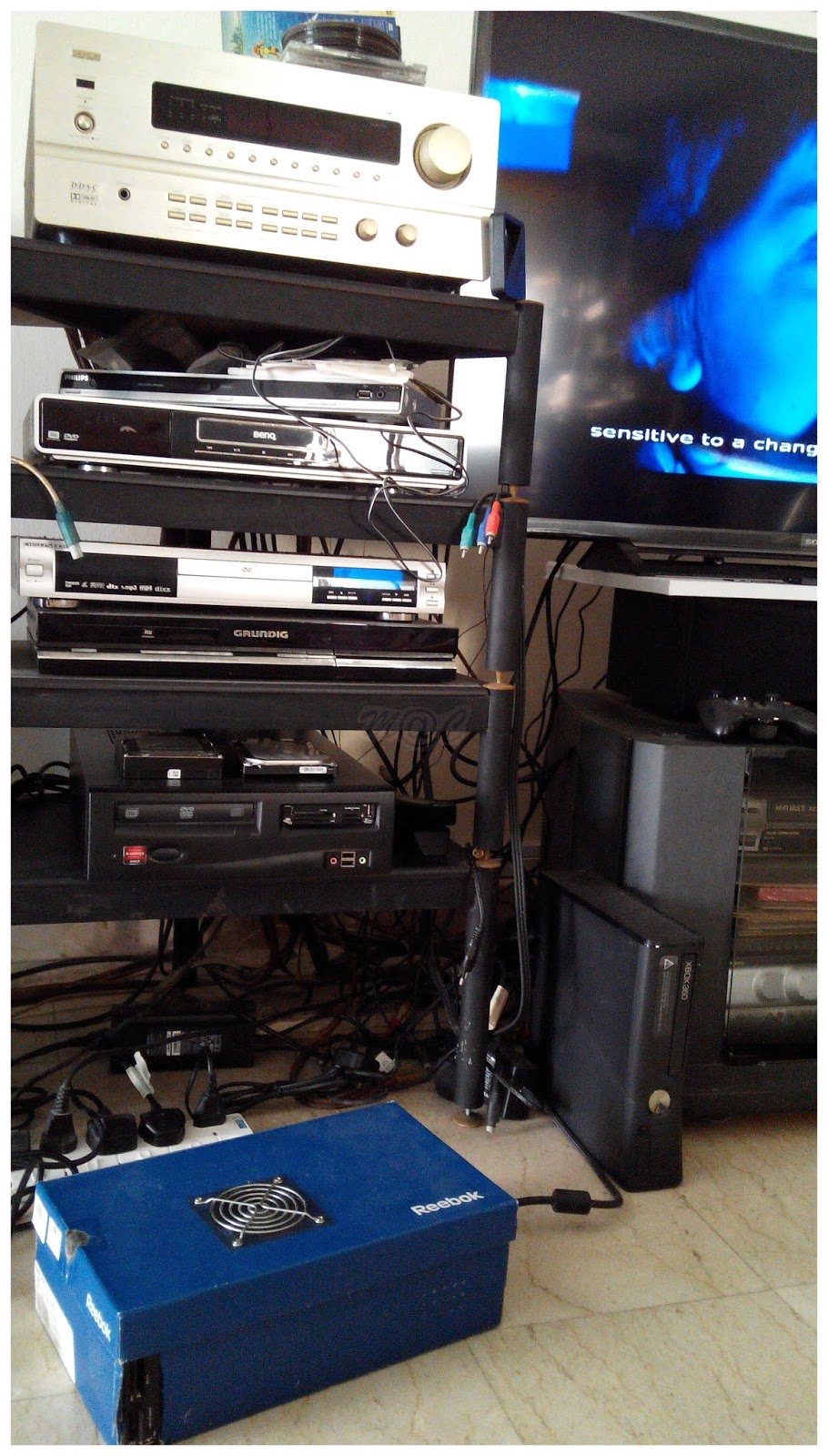
Backup Kodi HTPC in A Shoebox
Running Isengard 15.1 this time round, DIY-ed this purely for a 1-1 quick swap (sans the ODD) just in case the main Openelec rig ever goes down... assembled in an actual repurposed blue Reebok shoebox. Can't get more cheapskate or greener than that. lol
Just check out my present messy HTPC AV setup, so many redundant boxes to throw out soon!
Ah, can find only a single spare 1GB stick of RAM for now but hey wow, it still seems good enough for video viewing/streaming even with doing double time as shared video RAM too.
So don't just throw out your old shoeboxes from now on. :)
Sunday, August 23, 2015
My 1st Homebrewed Kodi x64 HTPC Box
Took a few days selecting the components, putting everything together and configuring it to take over the little bits and pieces of my home theatre setup and so far, it's perfect!
Even the AC3 Audio Config is working great with 5.1 sound through my creaky old Denon AVR, remember to enable the DD transcoding option to force CPU processed "on the fly" AAC 5.1 > AC3 to the AVR too.
And you might as well add on the Autosubs service and a couple of your personal fave subtitles websites to grab any missing subtitles automatically when the movie starts. Now that makes for an incredibly smart DIY media player.
Yup, this rig is based on the under appreciated but really wonderful AMD APU and probably way over-specced for it does, for now.
Other Components
ASRock > FM2A88X-ITX+ - with onboard dual band wifi, picked up the 5GHz without issues
After even more reading up on the OS, I tried out the (much) lower end Athlon A4-4000 dual core and just 2 x 1 GB DDR3-1333 RAM and so far Openelec ran just as smooth too. Ah, the simple joy of happy swapping around hardware parts without being heckled by the OS DRM - overall, really nice!
Notes
Wall power meter reads 18-20W in both idle as well as streaming video which is of course most gratifying.
Storage is in EXT4 format so you will need some method reading such a format in Windows. I use the freeware utility, Paragon ExtFS for Windows, which is slightly clunky but hey, it works and it is free!
To backup/clone you working boot OS flashdrive, conside using this freeware ImageUSB
Kodi Remote Controller
All you need is a handy smart phone/device plus wifi, simply choose from several free apps. Wifi remote control can be so liberating, no more line of sight needed!
Corsair RM850i Fully Modular Gold Power Supply - 1st Looks
Seems everything is new again with this new RMi 80plus Gold series from Corsair, the latest power supplies from Corsair.
So What's New
New updated Corsair sails logo
New RMi series - sitting between the earlier RM and HX series
New Type 4 cables
Features
7 year warranty
80 PLUS® Gold efficiency
100% Japanese 105°C capacitors
Fully modular
Corsair Link Integration for monitoring, adjustment of fan and multi-rail/single rail modes
135mm thermally controlled fluid dynamic bearing fan
Fan self-test switch
ZeroRPM mode for fanless operation
Specifications
Meanwhile, the RM850i is officially listed at $159.99 USD on Corsair's website. Corsair
* Do note that the 7 year warranty is a substantial 40% upgrade from the earlier RM non-i series.
Corsair famed PSU insider has this to say about the improvements... jonnyGURU forum post
"The RMi is more like a Gold HXi than an updated RM.
The similarities:
80 Plus Gold
Fully Modular
Zero RPM mode
SP135 fan
LLC Resonant Mode topology with DC to DC for the non-primary rails
The "upgrades":
7 year warranty vs. 5 years
ALL Japanese capacitors, including solids
Rated at 50°C vs. 40°C
FDB fan vs. Rifle bearing fan
Digital Link output allows for more monitoring and control than RM
If/when RM gets "updated" across the board, it's just going to get all Japanese caps and will probably lose Link to reduce cost."
My sample unit from Corsair USA...
Note the presence of the reinstated (and updated sharper) Corsair sail logo on the packing box, newly introduced on 1st June 2015. Read more here
Safely packed inside....
New B & W colour combo!
Again, the prominent angular Corsair logo to show that this is their newest PSU series.
Bundled goodies!
Note the Corsair Voyager flash stick comes only with press review units and contains a very long and detailed report for the tests this particular unit has undergone.
Click here to download the full report if you are interested RM850i_PK.txt
RM850i Proper
Note the digital Corsair Link label
Corsair Type 4 PSU Cables
Hmm, wait a minute... don't ever remember seeing Corsair Type 4 power cabling before, let's try to find out more about them...
A few comparison photos - the Type 3 main ATX cable is positioned above Type 4 and both are shown individually against the RM850i in the latter 2 photos to demonstrate the pin differences.
Custom Corsair PSU cable users for the new RMi series should take note and bear this disparity in mind whenever swapping PSUs.
Type 4 Cable Info
OK, here's the official word from Corsair veteran, Aaron Neal, Global Product Manager PSU. Also a shout out to Ms A.L for the info link up, a big thank you for your ever ready help.
Type 4 cables are new for the RMi series.
The biggest change between Type 3 and Type 4 is on the ATX 24 pin where we have added more sense wires making the DC connection on the PSU is 28 pins instead of 24.
The type 3 ATX cable will not directly plug into an RMi PSU without modification.
The rest of the cables, although labeled Type 4, are the same pin out as Type 3.
So there you have it straight from the guys at the source!
Wednesday, June 3, 2015
June 2015 - Rejigged Test Rig
Just a budget Lumia cam shot while leak checking, love those tubes curving in poetic symmetry. : )