Thursday, July 2, 2020

Asus ROG Strix B550-I Gaming Motherboard (Gen. Zen 2/3)

https://www.asus.com/Motherboards/ROG-STRIX-B550-I-GAMING/


"... ready to become your next compact gaming build."


Features

  • AMD B550 chipset motherboard
  • Mini ITX format
  • 2 x DIMM in dual channel, up to Max. 64GB, DDR4 5100(O.C)
  • ECC Memory (ECC mode) support varies by CPU
  • 1 x HDMI 2.1(4K@60HZ) *
  • 1 x DisplayPort 1.4 *
  • 1 x PCIe 4.0 x16
  • Intel® I225-V 2.5Gb Ethernet
  • Intel® Wi-Fi 6 AX200
  • Bluetooth v5.1*
  • Audio CODEC S1220A - SupremeFX 7.1 Surround Sound, Rear audio USB Type-C® port 
  • 256 Mb Flash ROM with BIOS FlashBack feature


Unboxing

The retail box may be small but it contains quite a fair bit of accessories especially adapters and cables.


Motherboard

Well endowed with onboard 8+2 power stages for a m-ITX model and eagle eyed owners staring hard enough at the back of the CPU socket may find a small through hole. Maybe Asus has plans to make this model fly sub-ambient cos the hole is likely meant for temperature probes used by hardcore overclockers during LN2 runs.


Note the BIOS FlashBack button, also the small VRM fan (BIOS controllable) and the cabled CMOS battery, both too well hidden under the I/O shroud. Interesting too is the dedicated USB-C Audio port*. One misses the older designs where the CMOS battery is socketed (hence easily replaced) even in m-ITX models.


* USB-C on PC World and USB-C and TB3 to musicians


8 pin CPU 12V plug, ample juice is needed to fly. Also seen is the 4 pin fan connector for the small VRM fan, btw its operating noise was inaudible next to the installed AMD Wraith Prism during testing.


And these are the impressive looking onboard VRM components accounting for the elaborate fan and heatsink setup.


3 x 4 pin fan headers alongside RGB headers


The 5Gbps USB3 and 10Gbps USB-C front headers are side by side here, right next to the system headers. Here's an interesting discussion on USB-C port implementation on other manufacturers... USB-C header but 5Gbps only?


4 x SATA3 ports sited nicely out of the way of the video card, using SATA cables with locks may get a little tight just like removing a thicc video card on a m-ITX mobo.


The nvme PCI-e 4.0 slot with its overlying integrated heatsink. Note the lack of any cooling fan for the B550 chipset which lies beneath this nvme/audio module in the classic Asus m-ITX stacking tradition for maximizing use of vertical space.


The AAFP header seems well concealed too.


The nvme PCI-e 3.0 slot is sited on the back of the motherboard without any bundled heatsink.


On the back is also the Intel 2.5Gbps I225-V Rev. B2 chip.


Setup

Asus Strix B550-I Gaming Mobo | Ryzen 3600X air | Strix RX5600 XT | 16GB Ballistix Sports kit 3200@3600 | 500GB WD Black nvme | Win 10 1909

Open ambient air, non-ac late June 2020 weather


Air cooler used is the AMD Wraith Prism from my retail R9 3900X, might as well get some use out of it. Installed video drivers are the China iCafe Adrenalin 20.4.2 slim drivers, pls note this is not WHQL certified and would not work properly with Microsoft secure boot either.


UEFI

My favourite UEFI, for all of its superb features and user-friendliness. The Advanced sub-menu has both AMD Overclocking and CBS options. Just some sample screenies.


* This set is a very early sample from Asus itself, this model is not yet on retail at time of testing.  But if your motherboard coincidentally comes with a stock factory 0205 early BIOS like this set, consider updating it stat to a newer and more stable version like 0608.


hwinfo64 Summary

NB: B550 chipset mis-identified as the older X570.


GPU-Z

The Asus Strix Radeon 5600XT ran just fine as expected operating at PCI-e 4.0.

NB: B550 chipset mis-identified as the older X570 by CPU-Z.


Benches 'n' Stresses


 CPU-Z


AIDA64


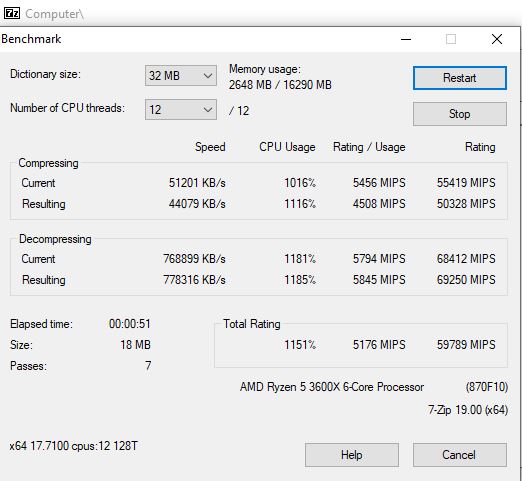
7Zip


HyperPi 32M

RAM stability check


Geekbench4

https://browser.geekbench.com/v4/cpu/15577237


Cinebench R20


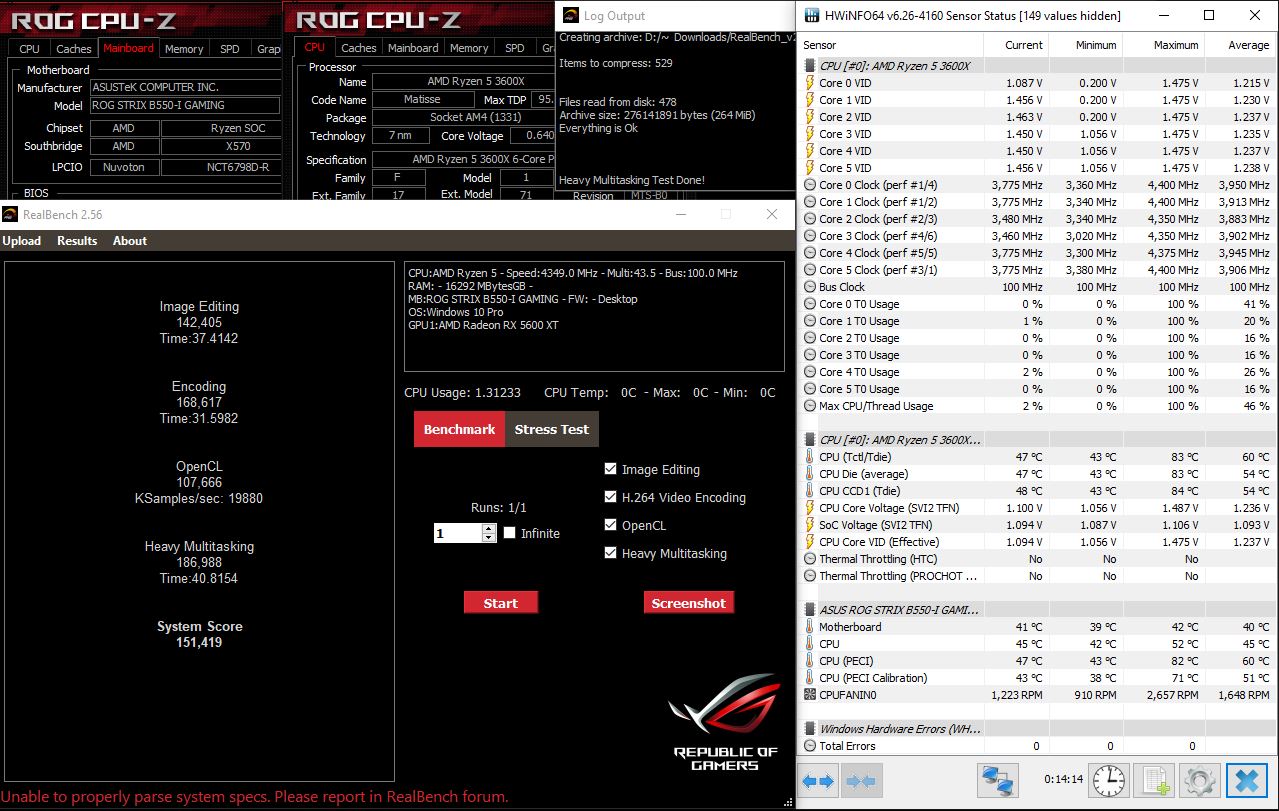
Realbench 2.56

Overall system stability check


VRMark Orange Room

Result - Super, Outstanding! https://www.3dmark.com/vrm/47920820


The Intel 2.5Gbps GLAN

Testing the onboard Intel 2.5Gb LAN port on a 1Gbps fibre plan.


Speedtest.net

Speed and ping seems all good to go.


DSLReports Jitter/Ping Test

Connection quality is Grade A+ according to https://www.dslreports.com/tools/pingtest


For more numbers with a 10G network and WiFi from LANOC's review, just jump over to this link
10G network test results


* There are reports of Intel 2.5Gb LAN early revision issues when used at full speeds. Zero mention of this in LANOC's review which posted good numbers in their 10G network tests. Locally, SG home folks are mostly maxxed at 1Gbps presently so actual impact IRL may vary..

Best network drivers for i225-V B2 revision to date is 1.0.1.4


hwinfo Monitoring

Observed over a few hours of usual PC usage eg. web surfing, downloading, decrypting, Spotify and Youtube, the R5 3600X cores seem to be hitting their boost clocks nicely.


NB: Latest 0608 BIOS solves the problem of the stock factory 0205 BIOS randomly rebooting at idle - a little teething hurdle but par for the course when testing the early BIOS versions.


Initial Impressions

With the latest BIOS update installed, the overall initial impression is definitely positive. There is no question that the motherboard now performs stable, fast and furious.

The immediate concerns are supply chain product scarcity and... price creep amidst an ongoing pandemic and looming global depression. The Strix B550-I's USD230 SRP is getting uncomfortably close to the USD260 SRP of the Strix X570-I model... maybe AMD,  Asus and/or other manufacturers can somehow convince consumers why they should choose the B550 over the higher end X570 models when the price difference is so tight.


Likes
  • Thoughtfully designed, maximizing vertical space with Asus m-ITX stacked design tradition
  • Built for performance
  • Bundled nvme PCI-e 4.0 heatsink is large and heavy
  • Forward looking with both USB3 and USB-C front headers
  • Well featured UEFI with easy DDR4-3200@3600 overclock
  •  BIOS FlashBack
  • Actively cooled VRM design 
  • Single POST, fast boot times

Can be improved...
  • Sparse back I/O section, can do with more traditional USB Type A ports
  • Non socketed CMOS battery
  • small VRM fan with ? life span and replacement scarcity


Sunday, June 7, 2020

Asus TUF Gaming B550M-Plus (Wi-Fi) AM4 Motherboard (Gen. Zen 2/3)

A more affordable PCI-e 4.0 platform is finally now amongst us, the arrival of AMD motherboards based on the long awaited AMD B550 AM4 chipset for Zen 2/3 processors.
 
https://www.asus.com/us/Motherboards/TUF-GAMING-B550M-PLUS-WI-FI/


These days, mATX models especially for the AM4 platform seem less common place (vis a vis ATX and m-ITX) and this is one budget oriented yet definitely still well featured model vs the competition.

For now, this appears to be the highest end mATX B550 model from Asus. The SRP seems to be roughly USD150-170 thereabouts according to most web info/rumours/leaks.


Features


  • AMD AM4 socket: Ready for 3rd Gen AMD Ryzen™ Processors
  • Enhanced power solution: 8+2 DrMOS power stages, ProCool connector, military-grade TUF components, and Digi+ VRM for maximum durability
  • Comprehensive cooling: VRM heatsinks, PCH fanless heatsink, M.2 heatsink, hybrid fan headers and Fan Xpert 2+ utility
  • Next-gen connectivity: PCIe 4.0 M.2, USB 3.2 Gen 2 Type-A and Type-C support
  • Made for online gaming: Intel® WiFi 6, 2.5 Gb Ethernet, TUF LANGuard and TurboLAN technology
  • AI noise-cancelling microphone: Provides crystal-clear in-game voice communication
  • ECC Memory (ECC mode) support varies by CPU


This is a good comparison table for Asus B550 models

Unboxing

Unassuming small retail box as expected in a budget mATX model.


Accessories


Motherboard

That large piece labelled as TUF GAMING is actually a solid aluminium heatsink and not a plastic shroud. Back I/O reveals the presence of digital SPDIF output and also a BIOS Flashback button for this model. This model has a 256Mb (32MB) capacity BIOS chip.

All these are higher end features, quite unusual on a budget model, which leaves one most pleasantly surprised.

This model uses 8+2 DrMOS power stages which is quite a step up from the equivalent B450 model using just 4+2.The beefed up components especially with its PCI-e 4.0 certification incrementally contributes to the new SRP of this B550 model over its B450 predecessor.

A cooler B550 Southbridge with passive cooling means less noise and one fewer potential failure spot vs an actively cooled one with its embedded mechanical fan viz. X570 chipset.

Video out ports mean that one can actually install the APU Ryzen processors in their moments of sudden insanity. OK OK, there is also the incoming Renoirs too.

The rather busy looking faux military PCB print scheme may yet appeal to some fans... well, guess it's still less in your face than actual golden toy bullets variants.


8 pin 12V CPU power plug, provision for enough juice.


Diagnostic discrete LEDs in lieu of a numerical panel, still useful. Its budget nature is showing up here.


SATA ports x 4, very well placed out of the way from the GPU slot.


nvme M.2 slots x 2 - 1 x 4.0 (no heatsink but very nicely located between CPU and GPU) and 1 x 3.0 (long heatsink bundled). Too bad, the nvme heatsink is not interchangeable between the 2  slots.

The CR2302 CMOS battery location is still nicely accessible with an installed GPU.


UEFI

Only the factory stock 0244 BIOS was available at this time of testing in late May 2020. Nonetheless, this version seems stable and mature enough already in testing as it is.

Both Ryzen 3300X test piece and 3600X retail processor POSTed 1st try and ran without any issues. Given only 2 days of proper availability for the 3300X sample with potentially super rushed testing, I decided instead to use my own retail 3600X for a more thorough and leisurely testing.

The UEFI appears to be well featured, complete with AMD CBS and overclocking sub-menus. Sample screenshots are as follows...


Still haven't found a good simple utility which can extract the AMD AGESA version info since it was reported that B550 models use a brand new version with cumbersome numbering reset as ComboAM4 V2 1.0.0.0 Just what you might expect from AMD Numerical Numbskull Nomenclature department.


hwinfo64 Summary

First GPU tried was the Asus Strix Radeon 5600XT which ran just fine as expected since it is a modern up to date PCI-e 4.0 GPU. Yup, definitely reported as communicating at PCI-e 4.0 alright.


Also tried out my faithful old non-GOP legacy GTX670 GPU for compatibility testing and the motherboard BIOS auto-configured itself for legacy mode and POSTed successfully and everything ran smoothly too.


Setup

Asus TUF B550M-Plus (Wifi) | Ryzen 3600X uv air | Strix RX5600 XT | 16GB Ballistix Sports kit 3200@3600 | 500GB WD Black nvme | Win 10 1909

Open ambient air, non-ac late May 2020 weather


The China iCafe Adrenalin 20.4.2 slim drivers, discovered by some sharp eyed Redditor, was installed. Note this is not WHQL certified and would not work properly with Microsoft secure boot either.


Benches 'n' Stresses


CPU-Z


AIDA64

Other than upping the RAM frequency from DDR4-3200 to 3600 and loosening the tRCD by 1, no particular tuning was done so it should be easy to improve on these numbers.


7Zip


HyperPi 32M

RAM stability check


Unigine Heaven 4.0 Bench


VRMark Orange

Rated Outstanding! https://www.3dmark.com/vrm/47339218


Cinebench R20


Realbench 2.56

Overall system stability check


Speedtest

Wired fibre connection using the onboard Realtek 2.5Gb LAN port. There are some reports of a buggy Intel 2.5Gb LAN chip implemention so the Realtek solution looks like a suitable alternative on budget motherboards.


MC Extractor Report

Still supports Athlon 3000G (CPUID 00810F081) in the present latest 1804 BIOS (AGESA 1.2.0.0). At ~SGD65 definitely the cheapest AM4 CPU and very useful for troubleshooting and flashing BIOS updates.


Initial Impressions

Very solid B550 mATX effort from Asus, totally smooth and fuss free during testing even at this early stage of introduction. Excellent choice as a backbone for a modern budget AMD rig for which Intel will have a very hard time competing against. Instead, the actual competition may be the lower end models of AMD's own X570 series which are now occasionally priced close enough for serious consideration eg. Asus X570 TUF Gaming.

Likes
  • Sizeable heatsinks for the VRM and PCI-e 3.0 nvme slot
  • Well designed layout - very spacious around CPU socket, good SATA ports clearance etc...
  • Very fast POST
  • Stable well featured UEFI
  • Easy RAM overclocking - DOCP works great and DDR4-3200@3600 easily achieved
  • BT and dual band Wifi 6 AX200 are onboard bundled
  • 32MB BIOS chip size - potential to cater for more generations of processor support
  • Video out ports x2 - 1 x DisplayPort 1.2, 1 x HDMI 2.1(4K@60HZ)
  • Useful debug LEDs

Can be improved...
  • Lack of heatsink for PCI-e 4.0 nvme slot, fortunately cheap to source for your own