Consumers are definitely getting mighty impatient waiting to get their hands on the latest and fastest PC stuff. With cabin fever and work from home arrangements due to the drawn out ongoing Covid-19 pandemic, AMD is painfully not helping things out with their trickle of Zen 3 processors. Price scalping just adds salt to the wound... so here comes Intel to the rescue?
In less than a year, Intel is already updating their enthusiast overclocking platform to the incoming Z590 (ETA March 2021) from Z490 (May 2020). Guess it is feeling too much heat from the AMD Zen3 onslaught.
The Z590 motherboard and RocketLake CPU combination finally brings Intel nearer to par with the competition with regards to PCI-e 4.0, after lagging behind since July 2019.
And in other news, "Intel's Rocket Lake could retake gaming performance crown from AMD" - PC Gamer report.
Intel® LGA 1200 socket: Ready for 11th and 10th Gen Intel® Core™ processors
Enhanced power solution: 14+2 DrMOS power stages, six-layer PCB, ProCool sockets, military-grade TUF components and Digi+ VRM for maximum durability
Comprehensive cooling: Enlarged VRM heatsink, PCH fanless heatsink, M.2 heatsinks, hybrid fan headers and Fan Xpert 4 utility
Next-gen connectivity: PCIe® 4.0, 20Gbps USB 3.2 Gen 2x2 Type-C®, front panel header for USB 3.2 Gen 1 Type-C® and Thunderbolt 4™ support
Made for online gaming: Intel® WiFi 6, Intel® 2.5 Gb Ethernet, TUF LANGuard and TurboLAN technology
Two-way AI Noise Cancelation: Reduces background noise from the microphone and audio output for crystal-clear communication in games or video conferences
Realtek S1200A codec: Pristine audio quality with unprecedented 108 dB signal-to-noise ratio for stereo line out and 103 dB SNR for line in
Box Label
Bundle
The accessories bundle is light while the mobo itself is surprisingly hefty (reportedly 1.7x heavier!)
Motherboard
Not your mundane rectangularly shaped PCB but different with a notched front and a trimmed corner too.
Hey, modern integrated I/O shield implementation is trickling down to the TUF range too. The back I/O seems impressive with a good array of ports, lacking mainly BIOS flashback/Clr CMOS buttons.
These massive heatsinks likely account for a good part of the weight of this mobo, nice impressive array of chokes too.
CPU socket caps population - a near full top with a sparse behind... yep, top heavy but not much of a bottom ;)
8+4 CPU power plugs
In keeping with the TUF (read non-ROG) range, note the lack of any heat-pipes between the heatsinks.
CPU fan and RGB connectors
Front USB connectors x 2, supports both USB 3.2 Gen 1 & 2. Missing are the ROG niceties like debug numerical LEDs, Power/Reset buttons. voltage checkpoints etc... you do get spot Q-LED instead. Functional but way too tiny and blindingly bright to use comfortably.
Forward SATA3 ports x 2, tucked and hidden away under the oversized Southbridge heatsink. Saw a certain YouTube video paper ''review'' missing them altogether and complaining about the paucity of SATA3 ports on this model. lol
Busy left edge with front case headers, upwards SATA3, fan, RGB, USB and Thunderbolt 4 headers, the long heatsink services 2 x M.2 ports too. Q-Latch tool-free retainers on each M.2 slot so no more dropping or losing pesky tiny screws (more on this later).
The standalone M.2 heatsink with the PCI-e 4.0 label (and it means exactly that ie. PCI-e 4.0 only)
Asus M.2 Q-Latch
Guess this is a good time to introduce a recent Asus innovation to their Z590 product line, getting rid of the tiny M.2 screws. Ah, the little wonders in life...
Seems to be early days for the BIOS as it had some issues with running and overclocking certain RAM (apparently Intel has just fixed their base code) eg. G.Skill DDR4-3600 16GVRB kit (likely Hynix C die) which had run without any problems on the earlier Z490/Z390 test motherboards.
There is also a slight but noticeable lag moving between submenus.
On the plus side, modern feature updates like OCTVB and ReSize BAR have been added which in addition to useful old favourites like change tracking makes things more interesting.
Noticed these uncommon options for "BIOS Image Rollback Support" and "Publish HII Resources" in the Tool sub-menu but can't find much more on them so please share if anyone has any good info.
From its wiki - https://en.wikipedia.org/wiki/Unified_Extensible_Firmware_Interface
HII = Human Interface Infrastructure
Is "BIOS Image Rollback Support" some form of BIOS recovery or just a facility for flashing older BIOS versions?
Note that the TUF UEFI features lack the little ROG overclocking niceties like SP score (Silicon Prediction), Cooler score etc... for whatever they are worth. Neither is the MemTest86 included either... THG
Test Setup
At the time of testing, there was no access to any of the new incoming 11th Gen. Intel RocketLake CPUs (needed for PCI-e 4.0) so the older but available ES i7-10700K CometLake-S (max PCI-e 3.0 only) was used.
Asus TUF GAMING Z590-PLUS WIFI Mainboard
Intel i7-10700K (ES) - with iGPU utilised
2 x 8GB Crucial Ballistix DDR4-3200 kit@XMP
Samsung Evo 850 SSD
Corsair HX1000i PSU
Deepcool Neptwin with single 120mm fan (Cooler Master)
Windows 10 build 20H2 clean install with latest updates
Open air test rig early February SG ~26-30C
The Micron-E based Crucial Ballistix kit provided a single and fast POST for quickly booting up the test rig, nice.
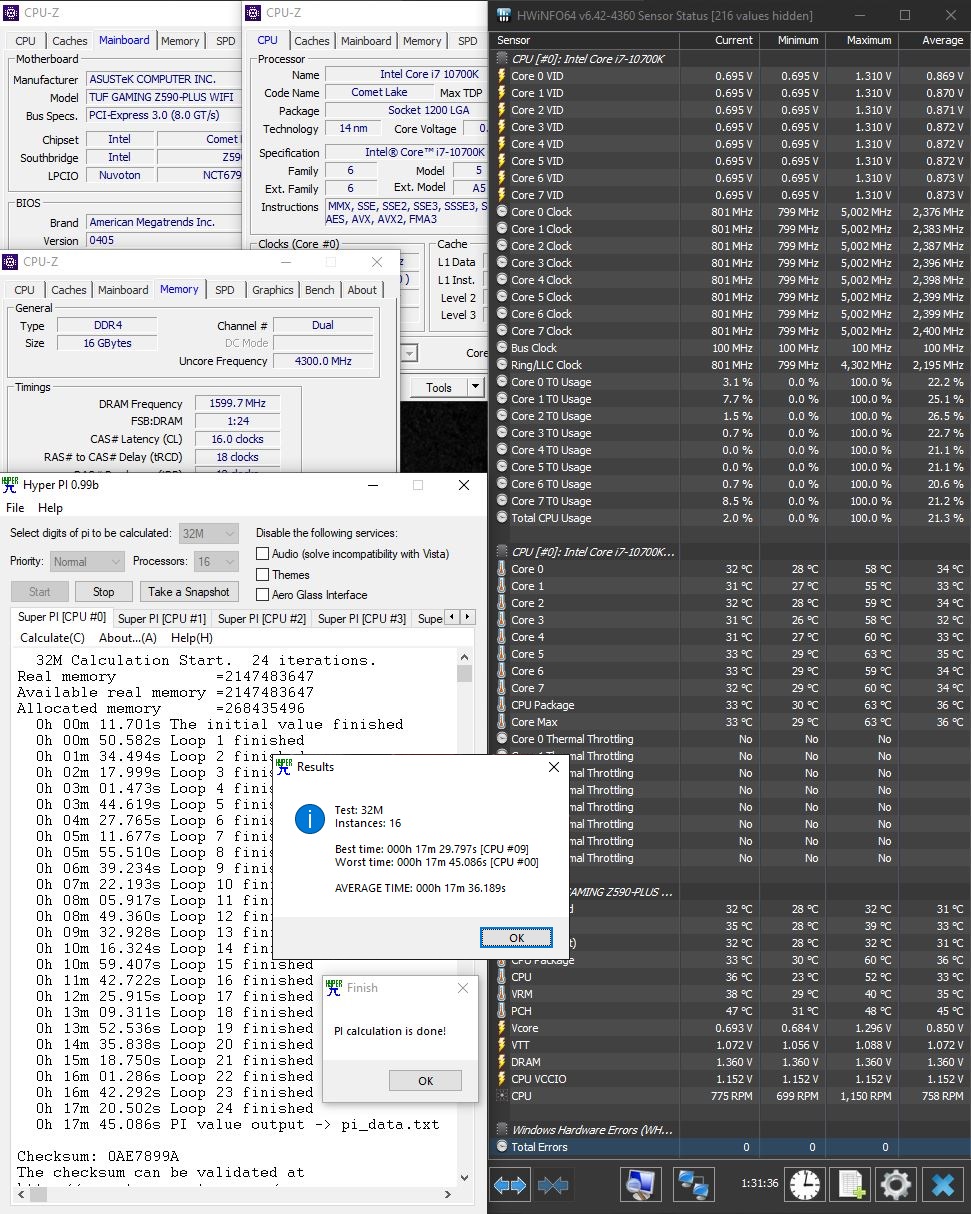
A simple overclock of all cores at 5GHz loaded was done for the i7-10700K with a -2 AVX offset ie. 5.0/4.8 GHz, basing off the hard work already done by the commercial binning outfit siliconlottery.com. Applying more elbow grease with the use of OCTVB may satisfy the more patient enthusiasts.
And overclocking at 5/5 vs 5/4.8 was previously discussed here.
A GTX 1060 6GB card was also later installed to check gaming stability, mainly a good excuse to revisit the GOG release of Wolfenstein: The New Order.
Here is a sprinkling of some demo numbers at 5/4.8GHz. Note the parameters are definitely not refined or tested for the 24/7 P95 crazed fans. :)
CPU-Z
Stock
5GHz
Cinebench R20
Cinebench R23
HyperPi 0.99b
Freebie RAM stability oldie, just can't beat the price. Oldtimer here still using oldtimer tools. lol
Realbench 2.56
OpenCL option was not enabled to run on the HD 630 iGPU (just holler if you really need this score)
O.C.C.T v7.3.2
Just getting re-aquainted with this oldie goldie, long time since last used so no longer familiar with it. Personally find prolonged pure synthetic stress tests super boring vs real life testing/gaming/video transcoding thus did only a 15 min mini-run just to check load parameters. No more pretty graph logs so sianzz to do more with it... see *footnote for info.
* PS: Really lots of changes in newer versions eg. it has switched to the hwinfo monitoring engine and the ever useful graphical logs are done only in paid subscriptions only - author too.
AIDA64 Bench
Latest beta version may be a pre-requisite in recognising the new Z590 chipset
Linpack Xtreme 1.1.5 Benchmark
Totally new to me so did a quickie run for a look see look see. The 2GB quickie run doesn't seem to load the CPU fully (correctly detected 16 threads at launch but reportedly used only 8) nor that hot either.
Pretty neat looking bench with concise score reporting though definitely not my fave game genre
Intel I225-V 2.5Gbps G.LAN
This Intel network chip has an unusually chequered history, no thanks to Intel's ineptitude in cleaning up the errata and driver messiness. Thus the need to address this issue each and every time any motherboard with this network chip is encountered... the latest B3 revision chip is found on this motherboard.
Intel seems on the way to resolving the issues with newer drivers eg. 1.0.2.8 (dated 18 Dec 2020) from the following Intel website link - Intel 1.0.2.8 drivers. Just skip the older ones from Asus website (1.0.1.8) and Windows Update (1.0.2.6) altogether.
The B3 revision is also helpfully denoted by its drivers in the Windows Device Manager as (3)
Tested on M1 500Mbps home fibre line
60s test run - https://packetlosstest.com/ (default run is 10s)
Initial Impressions
Decision making for potential buyers of this motherboard ultimately comes to buying either Intel or AMD so consider the following factors regarding this motherboard (not exhaustive, of course)
Well built 6 layered Z590 motherboard with good onboard power and hefty heatsinks all round
Well featured with 3 x M.2 ports, front and back 20Gbps USB 3.2 Gen2 ports, Thunderbolt 4, WiFi 6, latest B3 revision Intel 2.5Gbps G.LAN etc
Both tested i7-10700K and motherboard are capable of cool and silent running when overclocked on air
10th Gen K processors offer immediate availability presently with good gaming cost performance especially in view of Zen3 unavailability, scalper pricing and planned EOY EOL schedule
vs
Early days BIOS w.r.t RAM overclocking (common teething issue for new chipsets)
Retail RocketLake CPUs are unavailable and the rumoured pricing seems high
Z590 models command premium pricing yet possible LGA1200 EOY EOL status with the planned introduction of LGA1700
The Dark Hero is the latest Asus iteration of the proven AMD X570 enthusiast AM4 chipset based ROG motherboards.
The first round of X570 models warily debuted last year together with the Ryzen 3000 processors and has gone on to super dizzying sale successes (over Intel). Back then, AMD wasn't yet the big established success story of today. Many X570 models from that first round were barely adequate and seem to have been eclipsed by the more recent AMD B550 mainstream models which sported newer/faster LAN, Bluetooth and WIFI chipsets etc.
With the introduction of the incoming Ryzen 5000 processors which are now touted all round superiority over Intel, even in their last stronghold of single core processing and gaming, the time is simply ripe for a new round of refreshed and improved AMD X570 motherboards to cater to the growing demands of ever increasing numbers of AMD fans.
Here, Asus is clearly jumping at this second chance - at inventing a better wheel.
One main X570 specific bugbear is the need for active cooling of the 15W chipset. Using a tiny high speed chipset fan means potential noise and future mechanical failure and this sore point is addressed head-on by this latest Dark Hero model, simply use massive heatsinks and omit the fan.
Note the subtle refined LED lighting in this offical Asus photo, I like! Oh, check out the handsome heft of fan-less metal grille heatsink too.
"The Dark Hero is our first X570 board to implement a passive cooling
design. A massive high surface area heatsink covers the chipset and
extends into the space between the main PCIe slots to provide plenty of
heat dissipation. Compared to the active cooling design on the Crosshair
VIII Hero, the Dark Hero's chipset temperature under load is just 2.25%
higher in our internal testing.
The Crosshair VIII Dark Hero also employs an upgraded power design to
efficiently deliver large amounts of clean power to the highest-end
next-gen AMD CPUs for Socket AM4. When we provisioned this uprated
board, we chose 16 integrated TI power stages, each capable of
delivering 90A of current, and deployed them in a teamed power stage
topology."
Out of the box ready support for the Ryzen 5000 series.
AMD AM4 socket: Ready for 2nd, 3rd Gen AMD Ryzen™
processors and 3rd Gen AMD Ryzen™ processors with Radeon™ Graphics
Processors and up to two M.2 drives, USB 3.2 Gen2, and AMD StoreMI to
maximize connectivity and speed.
Comprehensive thermal design: Passive chipset heatsink, M.2 aluminum heatsinks and ROG Water Cooling Zone.
Robust power delivery: Designed power solution 14+2
TI power stages rated for 90A, ProCool II power connectors, microfine
alloy chokes and 10K Japanese-made black metallic capacitors
High-performance networking: On-board Wi-Fi 6
(Intel 802.11ax) with MU-MIMO support, 2.5 Gbps Ethernet (Realtek) and Gigabit Ethernet (Intel),
both with ASUS LANGuard protection, and support for GameFirst VI
software.
5-Way Optimization: Automated system-wide tuning, providing overclocking and cooling profiles that are tailor made for your rig.
DIY Friendly Design: Pre-mounted I/O shield, ASUS SafeSlot, BIOS flashback and premium components for maximum endurance.
Unmatched personalization: ASUS-exclusive Aura Sync RGB lighting, including RGB headers and addressable Gen 2 RGB headers
Industry-leading ROG audio: ROG SupremeFX S1220 is combined with the venerable ESS® ES9023P to deliver high-fidelity audio to headsets and exotic cans.
Comparison
Good only as a general guide cos neither comprehensive or complete. Henceforth, the preceding 2019 model shall affectionately be referred to as the "Lao Hero".
The side by side photo compare is simply déjà vu cos the original design is that good that it simply deserves to be redone but now in silence.
Unboxing
Asus signature ROG cardboard box. Kindly excuse the photo quality, all taken on a cold dark rainy day lah...
Bundle
Rather sparse for a high end model but everything that is needed is included.
The Mobo Itself
And not a single fan was to be found, strange first world situation where less is more.To ensure good cooling... expansive heatsinks for both the nvme and chipset are installed, taking up whatever possible real estate over the left half of the muthaboard.
Good spacing of the PCI-e slots, there is an open ended x4 slot too.
The CPU socket sports the tell-tale access hole for the LN2 crazed fans, the hallmark of something factory designed and built for extreme clocks.
The integrated back I/O is packed chockful of different access ports, very nice!
The VRM heatsinks are linked by a wide heatpipe, seen here near the 2 CPU power plugs.
Same heatpipe seen from another view, the awesome looking improved CPU power delivery components are also evident here.
Numerical debug LED display, plentiful onboard buttons and fan headers all point to the high end build. Yeah yeah RGB fans, you get your glitzy fix headers here too.
And for hardcore multi-meter needle pokers, here comes your fix. All those access points seen located south of the main power plug, next to the USB-C (USB 3.2 Gen 2) header.
8 SATA3 ports are sited beside the more traditional USB 3.2 Gen 1 header. The chipset heatsink sleek grille appearance really looks sibeh impressive and chio from this angle, hor?
System headers, more fan, temp. and RGB headers etc...
The remaining edge of the board and the other buttons.
The BIOS chip and reflash headers are placed in a very accessible spot, again very nice!
Overall, a very well thought out and usable design, save for the CMOS battery location. Guess we can't have it both ways since it is either the CMOS battery or the BIOS flash headers in that prime little corner. lol
Test Setup
Asus ROG Crosshair VIII Dark Hero | AMD Ryzen 7 3700X | Crucial DDR4-3200XMP@3600 16GB Kit | GTX 950 | Noctua D14 | Win 10 x64 20H2
Open air rig, early November 2020 ambient weather temps
BIOS used is factory stock, no other versions seem available at the present moment of testing. From the horse's mouth on this Reddit thread, Asus support confirmed this model is stock ready for Ryzen 5000 out of the box so no worries there.
All BIOS settings were run at stock except for the RAM which was set at DOCP/XMP and then selecting DDR4-3600 speed with tRCD loosened by 1.
You should be able to achieve better scores by tightening things further and playing with the vDIMM. Motherboard temps seem great for a passively cooled model, in fact only the central 140mm fan (ie. single) was used on the Noctua D14 so no ventilation help from that either.
Testing was done with a Ryzen 7 3700X before any new Ryzen 5000 series or Big Navi samples became available. Both samples were confirmed delayed at testing time, pity! Hopefully, these findings will be updated in the near future with Ryzen 5000 chips and a Big Navi card once more definitive test arrangements can be made.
Asus ROG UEFI
All time fave UEFI interface till now due to its simplicity, friendliness and. plentiful powerful options. Now improved with an Asus OC Exclusive: PBO Fmax Enhancer.
The F12 screenshot, Ctrl-F2
Save Profile as text file and Save and Reset change tracking list are simply heaven sent features.
Sample screenshots, showing the last minute rushed testing time stamps too. lol
The factory stock 0210 BIOS seemed stable in the testing and had no problems reaching the specced 3700X core boost speeds of 4.4GHz. Below are hwinfo64 monitoring results after a few hours of surfing and gaming to check 24/7 and idle stability.
OS Install
A fresh new install of the latest Windows 10 20H2/2009 ISO was done on a 750GB Crucial MX300 SSD, installation was fast and problem free with latest updates done.
Fast Startup
Pleasantly fast POST and boot into Windows 10 for a X570 motherboard. This screenshot is for a cold boot on the Crucial MX300 SATA SSD.
CPU-Z
AIDA64
HyperPi 0.99b
Occasionally misunderstood to be some kind of benchmark but this is more a quickie RAM stability grinding test akin to the more intensive CPU stability grinding in Prime95. Also relatively useful test to check load temps quickly.
The installed Crucial 16GB DDR4-3200 kit clears this test running at DDR4-3600MHz. It probably goes higher, just have to invest in more elbow greasing.
Cinebench R20
Asus OC Exclusive: PBO Fmax Enhancer Dynamic Overclocking
Finally, dynamic overclocking returns to Ryzen all thanks to some very crafty BIOS magic from The Stilt as implemented by Team Asus (hi there, Peter et al!).
Also check out the Youtube video by der8auer explaining in detail this very enticing feature. Note that core boost speed is preserved and both the Vcore and core clock speeds are dynamic.
Had to spend some time trying it out and yes, it already works very well at this early stage of development. Just a little nudge to the 3700X all core loading speed from the default 4GHz to 4.2GHz (5% increase) and the Cinebench R20 improvement is already evident, past the 5K points on air (7% increase). Temperatures are all good with the comprehensive threshold triggers built into this feature. (PS: the onboard debug display will now show OC.)
Note that with the 4.2GHz o'c, with Auto boost scalar/override set, each 3700X core now boosts over time to 4.4GHz.
A little more push at 4.25GHz, the CBR20 score is again better (8.4% improvement vs stock). This is a simple demo of the feature so there is thus possibility of clock stretching in the background. All in, very promising but as in all overclocking adventures, YMMV.
Vcore was set at 1.265V for 4.25GHz so it can be seen that this feature also allows the use of Ryzen undervolt overclocking (uvoc). Lower power means lower temps/noise/wear too.
Ha, Cinebench R23 just dropped so here goes...
Also tried out good ol' Realbench 2.56 this round (just spotted it lurking on my flashdrive), just to see the CPU load temps.
Out of the box, the new Ryzen 5000 series is already killing Intel, now overclocked Ryzen 5000 just adds to the burn... Intel is so very dead. So hey, just remember to have fun checking out this feature when you get your own Dark Hero.
Really fine work, The Stilt and Team Asus!
Silicon Lottery
Useful reference for Ryzen 3700X/3800X overclocking stats. Note the minuscule headroom for overclocking since AMD has binned and squeezed near max performance out of each chip at the factory. Makes sacrificing boost clocks and dynamic Vcore in most methods of manual overclocking scant worth the effort.
Ryzen R9 5900X Update
Finally got a retail boxed Zen3 processor to check the out of the box compatibility with the factory stock 0210 BIOS and it definitely works as stated as shown below. 2nd screenshot has a lil'' dynamic OC thrown in showing clear improvement over the stock CB r20 score.
Initial Impressions
For those who want quietness and reliability, there is good reason to opt
for this model since its massive heatsinks effectively void the need
for active cooling on the X570 chipset. Test load temperatures seen
earlier are definitely cool and safe.
For those who demand out of the box BIOS support for the new Ryzen 5000 series, this is a great fuss free choice. No worries about your new CPUs being unrecognised and unable to POST which is a real downer after spending bucket loads. No need to hunt for flashdrives and taking the risks of flashing a new BIOS just to make things start working.
So for those buying new, this new Dark Hero model is a good consideration. However for those contemplating upgrading from the older VIII Hero/Formula models, Asus support on Reddit reassures that performance/feature wise, they are probably near equals. So unless you are definitely sure about wanting passive cooling and feeling cash flushed...just go ahead and make yourself happy in these depressing Covid-19 times.
Likes
Out of box Ryzen 5000 support
Effective silent passive cooling
Best UEFI interface with plentiful options
Asus exclusive PBO Fmax Enhancer dynamic overclocking
Ambitious enthusiast design and feature packed build
Stable operation
Subdued lighting effects
Much lower USD400 SRP than the USD700 Giga Aorus Xtreme fanless model
Marginally higher SRP than the USD380 Lao Hero model
Dislikes
Still trying v.v.v. hard to think of one...hmm OK, rather late entrant to the AM4 platform twilight